IPI datadelivery API
Introduction
This is the documentation for the IPI datadelivery API.
Getting Started
The basics
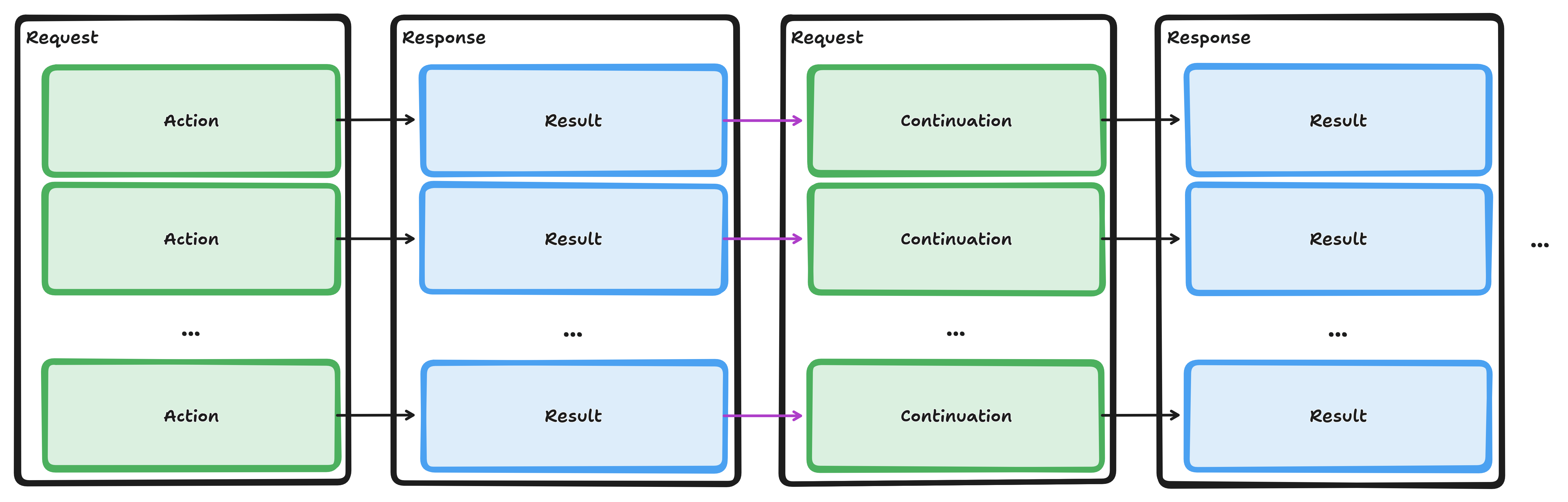
The API service works by sending an authenticated POST request to the primary API endpoint.
This request contains an XML-encoded ApiRequest that describes the actions to be processed.
The response will be an XML or ZIP file containing the result data and any continuation actions, if applicable.
Refer to the reference sections for guidance on programmatic usage and how to integrate the API service into your application. The code snippets in the authentication examples section may serve as a good starting point.
The following paragraphs provide examples of how to explore the API service.
Interactive Exploration
Import the following configurations into your Postman, Thunder Client, or EchoAPI application:
Adjust the
idpUsernameandidpPasswordvariables in the EnvironmentAdapt and execute the predefined requests in the Collection
One-off Scripting with PowerShell
First, we need a function to authenticate and obtain an access_token for the API service.
Remember that tokens are only valid for a limited time and must be refreshed periodically.
function Get-IpiDataDeliveryToken
{
  param (
    [string] $IdpUsername = $env:IDP_USERNAME,
    [string] $IdpPassword = $env:IDP_PASSWORD
  )

  $TOKEN_ENDPOINT="https://idp.ipi.ch/auth/realms/egov/protocol/openid-connect/token"
  $PARAMS = @{
    grant_type = "password"
    client_id = "datadelivery-api-client"
    username = $IdpUsername
    password = $IdpPassword
  }
  $res = Invoke-RestMethod -Method Post -Uri $TOKEN_ENDPOINT -ContentType "application/x-www-form-urlencoded" -Body $PARAMS
  return $res.access_token
}

$IdpCredentials = if ($IdpCredentials) { $IdpCredentials } else {
   Get-Credential -Message "Datadelivery IDP Credentials"
}
$env:IDP_USERNAME = $IdpCredentials.UserName
$env:IDP_PASSWORD = $IdpCredentials.GetNetworkCredential().Password
$env:IDP_TOKEN = $(Get-IpiDataDeliveryToken)
Next, we define a helper function that sends authenticated POST requests to the primary API endpoint.
function Invoke-IpiDataDeliveryApi
{
  param (
    [ValidateSet("xml","zip")][String] $Format = "xml",
    [string] $IdpToken = $env:IDP_TOKEN,
    [string] $RequestXml = "<ApiRequest xmlns='urn:ige:schema:xsd:datadeliverycore-1.0.0'/>",
    [switch] $AlwaysFile
  )

  $API_ENDPOINT="https://www.swissreg.ch/public/api/v1"
  $PARAMS = @{
    Uri = $API_ENDPOINT;
    Method = 'Post';
    Headers = @{
      Authorization = "Bearer ${IdpToken}";
      Accept = "application/${Format}";
    };
    ContentType = "application/xml";
    Body = $RequestXml;
  }
  if ($PSVersionTable.PSVersion.Major -ge 7)
  {
    $PARAMS += @{
      ResponseHeadersVariable = 'resHdr';
      StatusCodeVariable = 'resStatus'
    }
  }
  if ($AlwaysFile -Or $Format -Eq 'zip')
  {
    $res = New-TemporaryFile
    Invoke-RestMethod @PARAMS -OutFile $res
  } else
  {
    $res = Invoke-RestMethod @PARAMS
  }
  if ($resStatus)
  {
    Write-Information "Status: ${resStatus}"
  }
  if ($resHdr)
  {
    ConvertTo-Json $resHdr | ConvertFrom-Json | Format-List | Out-String | Write-Information
  }
  return $res
}
With these functions in place, we can now send our first ApiRequest to execute a TrademarkSearch action.
The API responds with an XML document containing the result of the first page of items satisfying the query.
If additional results are available, continuations for subsequent pages will be included as well.
$InformationPreference='Continue'

$res = Invoke-IpiDataDeliveryApi -Format xml -RequestXml @"
<ApiRequest xmlns="urn:ige:schema:xsd:datadeliverycore-1.0.0" xmlns:tm="urn:ige:schema:xsd:datadeliverytrademark-1.0.0">
    <Action type="TrademarkSearch">
        <tm:TrademarkSearchRequest xmlns="urn:ige:schema:xsd:datadeliverycommon-1.0.0">
            <Representation details="Maximal" />
            <Page size="10"/>
            <Query>
                <Any>wasser*</Any>
            </Query>
            <Sort>
                <LastUpdateSort>Descending</LastUpdateSort>
            </Sort>
        </tm:TrademarkSearchRequest>
    </Action>
</ApiRequest>
"@
Write-Output $res.InnerXml
Alternatively, responses can be delivered as a ZIP bundle.
This format contains the same information but compressed within a ZIP archive.
The result items and/or, optionally, their associated resources (e.g. images) and item facets
can be split into separate files within the archive by specifying Bundle as the ResourceAction
in the Representation element.
Delivering responses as a ZIP bundle offers several benefits. It reduces Response Data Transfer Quota consumption, as the data is compressed. Additionally, it simplifies data extraction and processing for the client. Having a ZIP archive with pre-split components allows clients to access and manipulate individual files directly, rather than parsing through a large XML document containing items from different namespaces.
$InformationPreference='Continue'

$resZip = Invoke-IpiDataDeliveryApi -Format zip -RequestXml @"
<ApiRequest xmlns="urn:ige:schema:xsd:datadeliverycore-1.0.0" xmlns:tm="urn:ige:schema:xsd:datadeliverytrademark-1.0.0">
    <Action type="TrademarkSearch">
        <tm:TrademarkSearchRequest xmlns="urn:ige:schema:xsd:datadeliverycommon-1.0.0">
            <Representation details="Default" images="Bundle">
                <Resource role="item" action="Bundle" />
            </Representation>
            <Page size="5"/>
            <Query>
                <Require>
                    <tm:FeatureCategory>Combined</tm:FeatureCategory>
                </Require>
            </Query>
            <Sort>
                <LastUpdateSort>Descending</LastUpdateSort>
            </Sort>
        </tm:TrademarkSearchRequest>
    </Action>
</ApiRequest>
"@
Move-Item -Path $resZip -Destination "result_$(Get-Date -Format FileDateTime).zip" -PassThru
A full traversal
When using Search Actions, the resulting items are divided into pages.
To retrieve additional pages of result items, it is necessary to extract the “NextPage” api:Continuation elements
and include them in a subsequent api:ApiRequest to the primary API endpoint.
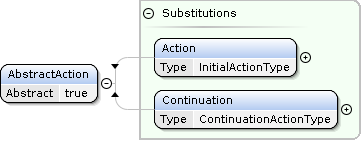
Since api:Continuation elements belong to the api:AbstractAction substitution group,
these elements can be directly transferred from the api:ApiResponse to the following api:ApiRequest.
Important
When executing bulk operations such as full traversals, be aware of your Response Data Transfer Quota consumption. Ensure your client applications are designed to adhere to the Retry-After Header if the API service signals that a pause is necessary.
Initial Requests for Full Traversals
To execute a full traversal of the database, create an initial query that retrieves all items containing the LastUpdate field.
Since this field is present in each data item, this query yields all possible items.
  <Page size="64"/>
  <Query>
    <LastUpdate/>
  </Query>
  <Sort>
    <LastUpdateSort>Ascending</LastUpdateSort>
  </Sort>
Tip
For optimal results, request an Ascending sort order on the LastUpdate field by including the LastUpdateSort element in your sorting criteria.
Be aware that if the underlying database is updated during the traversal, items may reappear in subsequent result pages when traversing in ascending order. Conversely, if you traverse in descending order, any item updated after the traversal begins might be omitted from all result pages.
Trademark Search full traversal request
This is an example request to start a full traversal for Trademark Search:
<?xml version="1.0"?>
<ApiRequest xmlns:xsi="http://www.w3.org/2001/XMLSchema-instance" xsi:schemaLocation="
    urn:ige:schema:xsd:datadeliverycore-1.0.0 urn:publicid:-:IGE:XSD+DATADELIVERYCORE+1.0.0:EN
    urn:ige:schema:xsd:datadeliverycommon-1.0.0 urn:publicid:-:IGE:XSD+DATADELIVERYCOMMON+1.0.0:EN
    urn:ige:schema:xsd:datadeliverytrademark-1.0.0 urn:publicid:-:IGE:XSD+DATADELIVERYTRADEMARK+1.0.0:EN"
  xmlns="urn:ige:schema:xsd:datadeliverycore-1.0.0" xmlns:tmk="urn:ige:schema:xsd:datadeliverytrademark-1.0.0">
  <Action type="TrademarkSearch">
    <tmk:TrademarkSearchRequest xmlns="urn:ige:schema:xsd:datadeliverycommon-1.0.0">
      <Page size="64"/>
      <Query>
        <LastUpdate/>
      </Query>
      <Sort>
        <LastUpdateSort>Ascending</LastUpdateSort>
      </Sort>
    </tmk:TrademarkSearchRequest>
  </Action>
</ApiRequest>
Patent Search full traversal request
This is an example request to start a full traversal for Patent Search:
<?xml version="1.0"?>
<ApiRequest xmlns:xsi="http://www.w3.org/2001/XMLSchema-instance" xsi:schemaLocation="
    urn:ige:schema:xsd:datadeliverycore-1.0.0 urn:publicid:-:IGE:XSD+DATADELIVERYCORE+1.0.0:EN
    urn:ige:schema:xsd:datadeliverycommon-1.0.0 urn:publicid:-:IGE:XSD+DATADELIVERYCOMMON+1.0.0:EN
    urn:ige:schema:xsd:datadeliverypatent-1.0.0 urn:publicid:-:IGE:XSD+DATADELIVERYPATENT+1.0.0:EN"
  xmlns="urn:ige:schema:xsd:datadeliverycore-1.0.0" xmlns:pat="urn:ige:schema:xsd:datadeliverypatent-1.0.0">
  <Action type="PatentSearch">
    <pat:PatentSearchRequest xmlns="urn:ige:schema:xsd:datadeliverycommon-1.0.0">
      <Page size="64"/>
      <Query>
        <LastUpdate/>
      </Query>
      <Sort>
        <LastUpdateSort>Ascending</LastUpdateSort>
      </Sort>
    </pat:PatentSearchRequest>
  </Action>
</ApiRequest>
Patent Publication Search full traversal request
This is an example request to start a full traversal for Patent Publication Search:
<?xml version="1.0"?>
<ApiRequest xmlns:xsi="http://www.w3.org/2001/XMLSchema-instance" xsi:schemaLocation="
    urn:ige:schema:xsd:datadeliverycore-1.0.0 urn:publicid:-:IGE:XSD+DATADELIVERYCORE+1.0.0:EN
    urn:ige:schema:xsd:datadeliverycommon-1.0.0 urn:publicid:-:IGE:XSD+DATADELIVERYCOMMON+1.0.0:EN
    urn:ige:schema:xsd:datadeliverypatentpublication-1.0.0 urn:publicid:-:IGE:XSD+DATADELIVERYPATENTPUBLICATION+1.0.0:EN"
  xmlns="urn:ige:schema:xsd:datadeliverycore-1.0.0" xmlns:patpub="urn:ige:schema:xsd:datadeliverypatentpublication-1.0.0">
  <Action type="PatentPublicationSearch">
    <patpub:PatentPublicationSearchRequest xmlns="urn:ige:schema:xsd:datadeliverycommon-1.0.0">
      <Page size="64"/>
      <Query>
        <LastUpdate/>
      </Query>
      <Sort>
        <LastUpdateSort>Ascending</LastUpdateSort>
      </Sort>
    </patpub:PatentPublicationSearchRequest>
  </Action>
</ApiRequest>
SPC Search full traversal request
This is an example request to start a full traversal for SPC Search:
<?xml version="1.0"?>
<ApiRequest xmlns:xsi="http://www.w3.org/2001/XMLSchema-instance" xsi:schemaLocation="
    urn:ige:schema:xsd:datadeliverycore-1.0.0 urn:publicid:-:IGE:XSD+DATADELIVERYCORE+1.0.0:EN
    urn:ige:schema:xsd:datadeliverycommon-1.0.0 urn:publicid:-:IGE:XSD+DATADELIVERYCOMMON+1.0.0:EN
    urn:ige:schema:xsd:datadeliveryspc-1.0.0 urn:publicid:-:IGE:XSD+DATADELIVERYSPC+1.0.0:EN"
  xmlns="urn:ige:schema:xsd:datadeliverycore-1.0.0" xmlns:spc="urn:ige:schema:xsd:datadeliveryspc-1.0.0">
  <Action type="SPCSearch">
    <spc:SPCSearchRequest xmlns="urn:ige:schema:xsd:datadeliverycommon-1.0.0">
      <Page size="64"/>
      <Query>
        <LastUpdate/>
      </Query>
      <Sort>
        <LastUpdateSort>Ascending</LastUpdateSort>
      </Sort>
    </spc:SPCSearchRequest>
  </Action>
</ApiRequest>
SPC Publication Search full traversal request
This is an example request to start a full traversal for SPC Publication Search:
<?xml version="1.0"?>
<ApiRequest xmlns:xsi="http://www.w3.org/2001/XMLSchema-instance" xsi:schemaLocation="
    urn:ige:schema:xsd:datadeliverycore-1.0.0 urn:publicid:-:IGE:XSD+DATADELIVERYCORE+1.0.0:EN
    urn:ige:schema:xsd:datadeliverycommon-1.0.0 urn:publicid:-:IGE:XSD+DATADELIVERYCOMMON+1.0.0:EN
    urn:ige:schema:xsd:datadeliveryspcpublication-1.0.0 urn:publicid:-:IGE:XSD+DATADELIVERYSPCPUBLICATION+1.0.0:EN"
  xmlns="urn:ige:schema:xsd:datadeliverycore-1.0.0" xmlns:spcpub="urn:ige:schema:xsd:datadeliveryspcpublication-1.0.0">
  <Action type="SPCPublicationSearch">
    <spcpub:SPCPublicationSearchRequest xmlns="urn:ige:schema:xsd:datadeliverycommon-1.0.0">
      <Page size="64"/>
      <Query>
        <LastUpdate/>
      </Query>
      <Sort>
        <LastUpdateSort>Ascending</LastUpdateSort>
      </Sort>
    </spcpub:SPCPublicationSearchRequest>
  </Action>
</ApiRequest>
Locating Continuation Elements
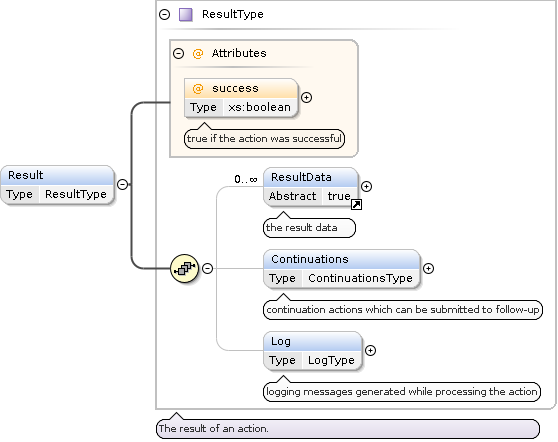
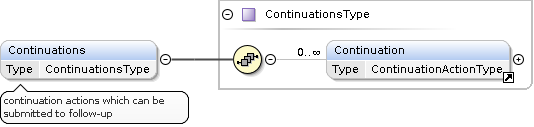
If present, the api:Continuation elements are nested within the api:Continuations wrapper element of the api:Result element.
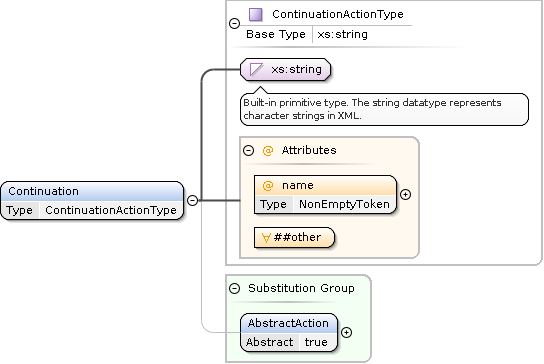
The Meta Element
The api:Meta element provides information about the current state of the traversal:
<api:Meta>
  <db:TotalItemCount xmlns:db="urn:ige:schema:xsd:datadeliverycommon-1.0.0">27707</db:TotalItemCount>
  <db:ItemCountOffset xmlns:db="urn:ige:schema:xsd:datadeliverycommon-1.0.0">0</db:ItemCountOffset>
  <db:ItemCount xmlns:db="urn:ige:schema:xsd:datadeliverycommon-1.0.0">64</db:ItemCount>
</api:Meta>
TotalItemCount: This element indicates the total number of items available across all pages. In the example above, there are
27707items in total.ItemCountOffset: This element specifies the offset of the first item on the current page. An offset of
0means that the current page begins with the first item in the set.ItemCount: This element represents the number of items returned on the current page. In this case, there are
64items on the current page.
Constructing the Follow-up Request
To effectively traverse through additional pages of results, it is crucial to correctly assemble the follow-up api:ApiRequest.
The code snippet below demonstrates how to extract the continuations and construct the follow-up request:
 1#!/usr/bin/env python3
 2from typing import Optional, Tuple, List
 3import xml.etree.ElementTree as ET
 4from copy import deepcopy
 5
 6namespaces = {
 7    'api': 'urn:ige:schema:xsd:datadeliverycore-1.0.0',
 8    'db': 'urn:ige:schema:xsd:datadeliverycommon-1.0.0'
 9}
10
11def api_followup_request(root: ET.Element, *continuation_names: str) -> Optional[Tuple[str, List[int]]]:
12    """
13    Extracts continuation elements from each api:Result element in an API response XML tree.
14    Only those continuations matching the provided 'continuation_names' (or all if none provided)
15    are included in a global ApiRequest XML element. This function also returns the indices (zero‐based)
16    of the api:Result elements that contributed at least one matching continuation.
17
18    Args:
19        root: The root XML element of the API response.
20        *continuation_names: Optional names of continuations (e.g., "NextPage") to filter by.
21
22    Returns:
23        A tuple where:
24          - the first element is a string representation of the combined ApiRequest XML containing matching continuations,
25          - the second element is a list of integers representing the indices of api:Result elements that contributed.
26        Returns None if no matching continuation is found.
27    """
28    followup = ET.Element('ApiRequest', {'xmlns': namespaces['api']})
29    indices: List[int] = []
30
31    result_elements = root.findall('./api:Result', namespaces)
32    for idx, result_elem in enumerate(result_elements):
33        continuation_elements = result_elem.findall('./api:Continuations/api:Continuation', namespaces)
34        added_from_this_result = False
35
36        for cont in continuation_elements:
37            cont_name = cont.attrib.get('name')
38            if not continuation_names or (cont_name in continuation_names):
39                followup.append(deepcopy(cont))
40                added_from_this_result = True
41
42        if added_from_this_result:
43            indices.append(idx)
44
45    if not indices:
46        return None
47
48    followup_xml = ET.tostring(followup, encoding='unicode')
49    return followup_xml, indices
50
51
52if __name__ == '__main__':
53    api_response_xml = """<?xml version="1.0" encoding="UTF-8"?>
54    <api:ApiResponse xmlns:api="urn:ige:schema:xsd:datadeliverycore-1.0.0">
55      <api:Result success="true">
56        <!-- ... -->
57        <api:Continuations>
58          <api:Continuation name="NextPage">QUVTL0dDTS9Ob1BhZGRpbmcAR0NN...</api:Continuation>
59        </api:Continuations>
60      </api:Result>
61      <api:Result success="true">
62        <!-- ... -->
63        <api:Continuations>
64          <api:Continuation name="SomeThingElse">QUVTL0dDTS9Ob1BhZGRpbmcAR0NN...</api:Continuation>
65        </api:Continuations>
66      </api:Result>
67    </api:ApiResponse>
68    """
69
70    result = api_followup_request(ET.fromstring(api_response_xml), "NextPage")
71    if result:
72        followup_xml, indices = result
73        print("Follow-up ApiRequest XML:")
74        print(followup_xml)
75        print("Contributing result indices:")
76        print(indices)
77    else:
78        print("No matching continuations found.")
How-To
Building Search Queries
When assembling a search action, a Query element is needed to describe the items to retrieve from the database.
Structure of a Query
A complete query is described by a Query element from the common schema.
The contents of the Query element is sequence of one or more AbstractQuery elements which are connected by an implicit Or disjunction. The overall structure is described by the following recursive grammar:
TopQueryType ::= Query{AbstractQuery+}
AbstractQuery ::= AbstractSimpleQuery | AbstractDecoratedQuery | CompoundQuery
CompoundQuery ::= Or{AbstractQuery+} | And{AbstractQuery+} | Not{AbstractQuery}
AbstractDecoratedQuery ::= Require{AbstractSimpleQuery} | Exclude{AbstractSimpleQuery}
AbstractSimpleQuery ::= Id | Any | LastUpdate | AbstractDefinedFieldsQuery
Simple Queries
Simple queries express search criteria on a single field of the queried entities.
Simple Query |
Type |
Item Field |
|---|---|---|
|
the item identifier |
|
|
the virtual default search field |
|
|
the last updated timestamp |
|
AbstractDefinedFieldsQuery |
consult defining schema |
extension point for additional search criteria |
For the specification of the various additional search criteria, consult the XSD schema of the respective concrete search request.
Simple Query Decorators
Decorators wrap a single simple query to refine the semantics of the wrapped search criteria.
Decorator |
Semantics |
|---|---|
|
The wrapped simple query must match |
|
The wrapped simple query must not match |
Compound Queries
Compound queries compose their nested child element queries.
Compound Query |
Semantics |
|---|---|
|
Disjunction: Any child element query (clauses) must match |
|
Conjunction: All child element queries (clauses) must match |
|
Negation: The single child element must not match |
Simple Query Types
String Queries
String queries are used for querying text based data.
Example: Searching for the phrase ‘blue light’
<Any>blue light</Any>
Example: Searching for the words ‘blue’ or light’
<Or>
  <Any>blue</Any>
  <Any>light</Any>
</Or>
Example: Disabling the wildcard semantics of * by setting the escape="true" attribute.
<Any escape="true">three stars ***</Any>
Important
Make sure that your XML is well‑formed by correctly escaping all special characters.
When constructing the ApiRequest XML with string templating mechanisms,
the following characters must be replaced by their respective XML entities:
<must be replaced with<>must be replaced with>&must be replaced with&'(apostrophe) must be replaced with'"(quotation mark) must be replaced with"
Escaping Utilities:
Java:
org.apache.commons.lang3.StringEscapeUtils.escapeXml10("Pam & Sam say, \"I'm impressed by the <Data>!\"")Python:
import xml.sax.saxutils as saxutils; saxutils.escape('''Pam & Sam say, "I'm impressed by the <Data>!"''')PowerShell:
[System.Security.SecurityElement]::Escape("Pam & Sam say, ""I'm impressed by the <Data>!""")
These functions will yield the following escaped string:
"Pam & Sam say, "I'm impressed by the <Data>!""

DateRange Queries
DateRange queries are used for querying data based on date and time.
Query attribute |
Default |
Description |
|---|---|---|
|
|
If true the lower bound is included (“greater than or equal”) |
|
|
Lower bound of the range (“start”). |
|
|
Upper bound of the range (“end”). |
|
|
If true the upper bound is included (“less than or equal”) |
Note
If present, the bounds will always be completed to full xs:dateTime timestamps including timezone information, to denote a precise point in time.
If the timezone information is not specified, it will be set to Europe/Zurich.
If the abbreviated xs:date format is used, then the missing time will be set to
midnight in Bern, Switzerland (i.e., 00:00:00 in the Europe/Zurich timezone).
Note
In the underlying database, all date and time information is stored as a single numerical value representing the milliseconds since the “epoch”, which is January 1, 1970, 00:00:00 UTC.
Therefore, when querying, the from and to values that define the range of included data must be mapped to the same numerical timeline.
For representing date-only information, the time component is set to midnight in Bern, Switzerland (i.e., 00:00:00 in the Europe/Zurich timezone).
For example, February 1, 2025 (2025-02-01) is actually represented as 2025-02-01T00:00:00+01:00[Europe/Zurich],
which corresponds to 2025-01-31T23:00:00Z in UTC time and equals to 1738364400000 milliseconds since the “epoch”.
Note
When using the default inclusive lower limit and exclusive upper limit behavior, i.e., includeFrom="true" and includeTo="false",
we adhere to the well-established tradition of using half-open intervals in computer science and many mathematical domains (set theory, calculus, analysis, etc.).
A major benefit of this convention is that it ensures clear demarcation between intervals without overlap when performing covering traversals of the timeline in multiple queries.
For example, if you have one interval [a, b) and the next [b, c), the point b is clearly part of the second interval, not the first.
This eliminates ambiguity and ensures that each point in time is covered exactly once, thus preventing missing or duplicate results.
Example: Last updated in February 2024. Note how this pattern correctly selects an entire month, regardless of whether it has 28, 29, 30, or 31 days.
<LastUpdate from="2024-02-01" to="2024-03-01" />


Reference
Authentication
Registration
Access to the API service is protected by our identity provider service.
To register for an account please apply for a trade mark data account.
Note
Currently, even if you plan to use the API service for other data domains than trade mark, please sign up for a trade mark data account. Usage is not restricted to trade mark data.
Access Tokens
To acquire initial access tokens and refresh existing ones, you need to interact with the OpenID Connect token endpoint at the following URL:
https://idp.ipi.ch/auth/realms/egov/protocol/openid-connect/token
The client_id used for this process is the constant string: datadelivery-api-client.
The successful JSON responses from this token endpoint are structured as follows:
{
  "access_token": "HEADER.PAYLOAD.SIGNATURE",
  "expires_in": 720,
  "refresh_expires_in": 360,
  "refresh_token": "HEADER.PAYLOAD.SIGNATURE",
  "token_type": "bearer",
  "not-before-policy": 1559831758,
  "session_state": "UUID",
  "scope": ""
}
Status
200: Successful ResponseStatus
4xx: Error Response
This JSON response includes properties such as the access_token, which is used for authentication, and refresh_token, which allows you to obtain a new access token without re-authenticating. The expires_in and refresh_expires_in fields indicate the validity duration (seconds) of the access and refresh tokens, respectively.
Get initial tokens
You can acquire the initial pair of access and refresh tokens by utilizing the OAuth 2.0: Resource Owner Password Credentials Grant procedure.
Important
Do not get new initial tokens for every API request.
Instead, reuse the access_token throughout its validity period as specified by the expires_in property in the token endpoint response.
To extend the token’s validity, use the refresh_token rather than repeatedly requesting new initial tokens.
Failing to reuse tokens appropriately may result in penalties.
Refresh the tokens
Before the refresh_token expires, employ the OAuth 2.0: Refreshing an Access Token procedure
to obtain a new pair of access and refresh tokens.
Important
The total lifetime of a session is limited to 600 minutes (10 hours).
If, after refreshing, the expires_in value of the new access_token is less than the normal 720 seconds,
then start a new session by getting a fresh initial token.
Examples
VS Code REST Client
###
# @name login
# @prompt username IDP_USERNAME (email)
# @prompt password IDP_PASSWORD
POST https://idp.ipi.ch/auth/realms/egov/protocol/openid-connect/token
Accept: application/json
Content-Type: application/x-www-form-urlencoded

client_id=datadelivery-api-client
&grant_type=password
&username={{username}}
&password={{password}}

###
@base_url = https://www.swissreg.ch/public
@access_token = {{login.response.body.$.access_token}}
@expires_in = {{login.response.body.$.expires_in}}
@refresh_token = {{login.response.body.$.refresh_token}}
@refresh_expires_in = {{login.response.body.$.refresh_expires_in}}

###
# @name login
POST https://idp.ipi.ch/auth/realms/egov/protocol/openid-connect/token
Accept: application/json
Content-Type: application/x-www-form-urlencoded

client_id=datadelivery-api-client
&grant_type=refresh_token
&refresh_token={{refresh_token}}

###
POST {{base_url}}/api/v1
Authorization: Bearer {{access_token}}
Accept: application/xml
Content-Type: application/xml

<ApiRequest xmlns="urn:ige:schema:xsd:datadeliverycore-1.0.0" uuid="{{$guid}}" timestamp="{{$datetime iso8601}}">
</ApiRequest>

###
POST {{base_url}}/api/v1
Authorization: Bearer {{access_token}}
Accept: application/xml
Content-Type: application/xml

<ApiRequest xmlns="urn:ige:schema:xsd:datadeliverycore-1.0.0" uuid="{{$guid}}" timestamp="{{$datetime iso8601}}">
    <Action type="Echo"/>
    <Action type="UserQuota"/>
</ApiRequest>
Bash shell
# IDP credentials
IDP_USERNAME="${IDP_USERNAME-"$(read -r -p    'IDP_USERNAME: '; echo "${REPLY}")"}" #e.g. "hanna.muster@example.com"
IDP_PASSWORD="${IDP_PASSWORD-"$(read -r -s -p 'IDP_PASSWORD: '; echo "${REPLY}")"}" #e.g. "s3cretPassWord"

# API smoketest
function api_smoketest() {
  API_ENDPOINT="https://www.swissreg.ch/public/api/v1"
  NO_ACTION_REQUEST="<ApiRequest xmlns='urn:ige:schema:xsd:datadeliverycore-1.0.0'/>"
  curl -D /dev/stderr -X POST -H "$API_AUTHORIZATION" -H 'Accept: application/xml' -H 'Content-Type: application/xml' --data-binary "${NO_ACTION_REQUEST}" "${API_ENDPOINT}"

  command -v oha >/dev/null && # https://github.com/hatoo/oha
  oha -c 12 -n 100 -m POST -H "$API_AUTHORIZATION" -H 'Accept: application/xml' -H 'Content-Type: application/xml' -d "${NO_ACTION_REQUEST}" "${API_ENDPOINT}"
}

# Get initial tokens
IDP_RESPONSE="$(curl -s -D /dev/stderr \
  -H "accept: application/json" \
  -d "grant_type=password" \
  -d "client_id=datadelivery-api-client" \
  -d "username=${IDP_USERNAME}" \
  -d "password=${IDP_PASSWORD}" \
  "https://idp.ipi.ch/auth/realms/egov/protocol/openid-connect/token"
)"

## Extract tokens from response
jq '. | .expires_in, .refresh_expires_in' <<<"$IDP_RESPONSE"
IDP_TOKEN="$(jq -r .access_token <<<"$IDP_RESPONSE")"
IDP_REFRESH_TOKEN="$(jq -r .refresh_token <<<"$IDP_RESPONSE")"
API_AUTHORIZATION="Authorization: Bearer ${IDP_TOKEN}"

api_smoketest

# Refresh the tokens
IDP_RESPONSE="$(curl -s -D /dev/stderr \
  -H "accept: application/json" \
  -d "grant_type=refresh_token" \
  -d "client_id=datadelivery-api-client" \
  -d "refresh_token=${IDP_REFRESH_TOKEN}" \
  "https://idp.ipi.ch/auth/realms/egov/protocol/openid-connect/token"
)"

## Extract tokens from response
jq '. | .expires_in, .refresh_expires_in' <<<"$IDP_RESPONSE"
IDP_TOKEN="$(jq -r .access_token <<<"$IDP_RESPONSE")"
IDP_REFRESH_TOKEN="$(jq -r .refresh_token <<<"$IDP_RESPONSE")"
API_AUTHORIZATION="Authorization: Bearer ${IDP_TOKEN}"

api_smoketest

export API_AUTHORIZATION
TypeScript with Deno
  1import { delay } from "jsr:@std/async/delay";
  2import { promptSecret } from "jsr:@std/cli/prompt-secret";
  3
  4const idpClientId = "datadelivery-api-client";
  5const idpEndpoint =
  6  "https://idp.ipi.ch/auth/realms/egov/protocol/openid-connect/token";
  7
  8const apiEndpoint = "https://www.swissreg.ch/public/api/v1";
  9const noActionRequest =
 10  `<ApiRequest xmlns='urn:ige:schema:xsd:datadeliverycore-1.0.0'/>`;
 11
 12// Utility function to prompt user for input.
 13function getConfig(envVar: string, hide: boolean): string {
 14  const envValue = Deno.env.get(envVar);
 15  if (envValue) {
 16    return envValue;
 17  }
 18  const input = (hide ? promptSecret : prompt)(`${envVar}: `);
 19  if (!input) {
 20    throw new Error(`No input provided for ${envVar}`);
 21  }
 22  return input;
 23}
 24
 25const idpUsername = getConfig("IDP_USERNAME", false);
 26const idpPassword = getConfig("IDP_PASSWORD", true);
 27
 28// Global token storage.
 29// deno-lint-ignore no-explicit-any
 30let tokenData: Record<string, any> = {};
 31
 32// Fetches a token from the IDP using the specified grant type and parameters.
 33async function fetchToken(
 34  grantType: string,
 35  params: Record<string, string>,
 36): Promise<Record<string, unknown>> {
 37  console.log(`Requesting token with grant_type: ${grantType}...`);
 38
 39  const formData = new URLSearchParams({
 40    grant_type: grantType,
 41    client_id: idpClientId,
 42    ...params,
 43  });
 44
 45  const response = await fetch(idpEndpoint, {
 46    method: "POST",
 47    headers: {
 48      "Accept": "application/json",
 49      "Content-Type": "application/x-www-form-urlencoded",
 50    },
 51    body: formData.toString(),
 52  });
 53
 54  if (!response.ok) {
 55    throw new Error(
 56      `Error fetching token: ${response.status} ${response.statusText}`,
 57    );
 58  }
 59  const data = await response.json();
 60
 61  console.log(
 62    "Token expires_in:",
 63    data.expires_in,
 64    ", refresh_expires_in:",
 65    data.refresh_expires_in,
 66  );
 67
 68  return data;
 69}
 70
 71// Get credentials and request the initial token.
 72async function initialToken(): Promise<void> {
 73  console.log("Initial token...");
 74  tokenData = await fetchToken("password", {
 75    username: idpUsername,
 76    password: idpPassword,
 77  });
 78}
 79
 80// Refreshes token and updates tokenData.
 81async function refreshToken(): Promise<void> {
 82  console.log("Refreshing token...");
 83  if (!tokenData.refresh_token) {
 84    throw new Error("No refresh token available");
 85  }
 86  tokenData = await fetchToken("refresh_token", {
 87    refresh_token: tokenData["refresh_token"],
 88  });
 89  console.log("Token refreshed. New access token:", tokenData.access_token);
 90}
 91
 92// Starts a background loop that periodically refreshes the token.
 93export async function startTokenRefreshLoop(): Promise<void> {
 94  await initialToken();
 95  (async function refreshLoop() {
 96    while (true) {
 97      const refreshExpiresIn = tokenData.refresh_expires_in;
 98      // Calculate sleep time as 90% of the current refresh token's lifetime (in seconds)
 99      const sleepSeconds = Math.max(1, Math.floor(refreshExpiresIn * 0.9));
100      console.log(
101        `Sleeping for ${sleepSeconds} seconds before next token refresh...`,
102      );
103      await delay(sleepSeconds * 1000);
104
105      const oldExpires = tokenData.expires_in;
106      try {
107        await refreshToken();
108      } catch (e) {
109        console.error(
110          "Error in refresh-token:",
111          (e as Error).message,
112          "- calling initial-token instead.",
113        );
114        await initialToken();
115      }
116      // If new "expires_in" is lower than the previous value then reinitialize token.
117      if (tokenData.expires_in < oldExpires) {
118        console.log(
119          "New :expires_in is lower than the previous value; fetching new initial token...",
120        );
121        await initialToken();
122      }
123    }
124  })();
125}
126
127// Sends an authenticated POST request to the API endpoint with the given XML body.
128export function apiPost(body: string): Promise<Response> {
129  if (!tokenData.access_token) {
130    throw new Error("No access token available");
131  }
132  const headers = {
133    "Authorization": `Bearer ${tokenData.access_token}`,
134    "Accept": "application/xml",
135    "Content-Type": "application/xml",
136  };
137
138  return fetch(apiEndpoint, {
139    method: "POST",
140    headers,
141    body,
142  });
143}
144
145// Runs an API smoketest by sending a no-action XML request to the API.
146export async function apiSmokeTest(): Promise<void> {
147  console.log("Running API smoketest...");
148  try {
149    const response = await apiPost(noActionRequest);
150    const status = response.status;
151    const responseText = await response.text();
152    console.log("status =", status, "body =", responseText);
153  } catch (e) {
154    console.error("Error in API smoketest:", (e as Error).message);
155  }
156}
157
158if (import.meta.main) {
159  await startTokenRefreshLoop();
160  await delay(1000);
161  console.log("Press Ctrl+C to exit.");
162  while (true) {
163    await apiSmokeTest();
164    await delay(300_000);
165  }
166}
Clojure with Babashka
  1#!/usr/bin/env bb
  2(ns ipi-datadelivery
  3  (:require [babashka.http-client :as http]
  4            [clojure.data.xml :as xml]
  5            [cheshire.core :as json]))
  6
  7(def api-endpoint "https://www.swissreg.ch/public/api/v1")
  8(def idp-endpoint "https://idp.ipi.ch/auth/realms/egov/protocol/openid-connect/token")
  9(def idp-client-id "datadelivery-api-client")
 10
 11(defn- get-config
 12  [env-var hide?]
 13  (or (System/getenv env-var)
 14      (let [prompt-msg (str env-var ": ")]
 15        (if hide?
 16          (println prompt-msg "(input will be visible)")
 17          (print prompt-msg))
 18        (flush)
 19        (read-line))))
 20
 21(def idp-username (get-config "IDP_USERNAME" false))
 22(def idp-password (get-config "IDP_PASSWORD" true))
 23
 24;; Global atom to store token information.
 25(def ^:private token-data (atom {}))
 26
 27(defn- fetch-token
 28  "Fetches a token from the IDP using the specified grant type and parameters.
 29   Returns the parsed JSON response."
 30  [grant-type params]
 31  (println (str "Requesting token with grant_type: " grant-type "..."))
 32  (let [resp (http/post idp-endpoint
 33                        {:headers {"accept" "application/json"}
 34                         :form-params (merge {"grant_type" grant-type
 35                                              "client_id" idp-client-id}
 36                                       params)})
 37        data (-> resp :body (json/parse-string true))]
 38    #_(println (:body resp))
 39    (println "Token expires_in:" (:expires_in data)
 40             ", refresh_expires_in:" (:refresh_expires_in data))
 41    data))
 42
 43(defn- initial-token
 44  "Obtains the initial token using the user credentials and stores it in token-data."
 45  []
 46  (println "Initial token...")
 47  (let [data (fetch-token "password" {"username" idp-username "password" idp-password})]
 48    (reset! token-data data)))
 49
 50(defn- refresh-token
 51  "Attempts to refresh the token. On success, updates token-data."
 52  []
 53  (println "Refreshing token...")
 54  (let [data (fetch-token "refresh_token" {"refresh_token" (:refresh_token @token-data)})]
 55    (reset! token-data data)
 56    (println "Token refreshed. New access token:" (:access_token data))))
 57
 58(defn start-token-refresh-loop
 59  "Starts a background loop that periodically refreshes the token.
 60   It calculates the sleep interval as 90% of the current refresh token's lifetime."
 61  []
 62  (initial-token)
 63  (future
 64    (while true
 65      (let [refresh-expires-in (:refresh_expires_in @token-data)
 66            sleep-seconds (max 1 (int (* refresh-expires-in 0.9)))]
 67        (println "Sleeping for" sleep-seconds "seconds before next token refresh...")
 68        (-> sleep-seconds java.time.Duration/ofSeconds Thread/sleep)
 69        (let [old-expires (:expires_in @token-data)]
 70          (try
 71            (refresh-token)
 72            (catch Exception e
 73              (println "Error in refresh-token:" (.getMessage e) "- calling initial-token instead.")
 74              (initial-token)))
 75          (when (< (:expires_in @token-data) old-expires)
 76            (println "New :expires_in is lower than the previous value; fetching new initial token...")
 77            (initial-token)))))))
 78
 79(defn api-post
 80  "Sends an authenticated POST request to the API endpoint with the given XML body."
 81  [body]
 82  (let [headers {"Authorization" (str "Bearer " (:access_token @token-data))
 83                 "Accept" "application/xml"
 84                 "Content-Type" "application/xml"}]
 85    (http/post api-endpoint {:headers headers :body body})))
 86
 87(start-token-refresh-loop)
 88(-> "PT1S" java.time.Duration/parse Thread/sleep)
 89
 90(defn api-smoketest
 91  "Runs an API smoketest by sending a no-action XML request to the API.
 92   It prints the response status, a UUID from the XML response, and the formatted XML."
 93  []
 94  (println "Running API smoketest...")
 95  (let [no-action-request "<ApiRequest xmlns='urn:ige:schema:xsd:datadeliverycore-1.0.0'/>"
 96        resp (api-post no-action-request)
 97        xml-data (-> resp :body xml/parse-str)]
 98    (println "status=" (:status resp)
 99             "uuid=" (-> xml-data :attrs :uuid)
100             "body=" (xml/indent-str xml-data))))
101
102(println "Press Ctrl+C to exit.")
103(while true
104  (api-smoketest)
105  (-> "PT5M" java.time.Duration/parse Thread/sleep))
Python with Requests
  1#!/usr/bin/env python3
  2import os
  3import threading
  4import time
  5import xml.etree.ElementTree as ET
  6from getpass import getpass
  7import requests
  8from requests.adapters import HTTPAdapter
  9from typing import Any, Dict
 10
 11api_endpoint: str = "https://www.swissreg.ch/public/api/v1"
 12idp_endpoint: str = "https://idp.ipi.ch/auth/realms/egov/protocol/openid-connect/token"
 13idp_client_id: str = "datadelivery-api-client"
 14
 15api_session: requests.Session = requests.Session()
 16api_session.mount("https://", HTTPAdapter(pool_connections=12, pool_maxsize=12, max_retries=0, pool_block=True))
 17
 18def get_config(env_var: str, hide: bool) -> str:
 19    value: str | None = os.getenv(env_var)
 20    if value is None:
 21        prompt: str = f"{env_var}: "
 22        value = (getpass if hide else input)(prompt)
 23    return value
 24
 25idp_username: str = get_config("IDP_USERNAME", False)
 26idp_password: str = get_config("IDP_PASSWORD", True)
 27
 28token_data: Dict[str, Any] = {}
 29token_lock = threading.Lock()
 30
 31def fetch_token(grant_type: str, params: Dict[str, str]) -> Dict[str, Any]:
 32    print(f"Requesting token with grant_type: {grant_type}...")
 33    payload = {"grant_type": grant_type, "client_id": idp_client_id, **params}
 34    resp = api_session.post(idp_endpoint, headers={"accept": "application/json"}, data=payload)
 35    data: Dict[str, Any] = resp.json()
 36    print(f"Token expires_in: {data.get('expires_in')}, refresh_expires_in: {data.get('refresh_expires_in')}")
 37    return data
 38
 39def initial_token() -> None:
 40    print("Initial token...")
 41    new_token = fetch_token("password", {"username": idp_username, "password": idp_password})
 42    with token_lock:
 43        global token_data
 44        token_data = new_token
 45
 46def refresh_token() -> None:
 47    print("Refreshing token...")
 48    with token_lock:
 49        current_refresh = token_data.get("refresh_token", "")
 50        new_data = fetch_token("refresh_token", {"refresh_token": current_refresh})
 51        token_data.update(new_data)
 52        print("Token refreshed.")
 53
 54def token_refresh_loop() -> None:
 55    initial_token()
 56    while True:
 57        with token_lock:
 58            refresh_expires_in = int(token_data.get("refresh_expires_in", 300))
 59            old_expires = int(token_data.get("expires_in", 0))
 60        sleep_seconds: int = max(1, int(refresh_expires_in * 0.9))
 61        print("Sleeping for", sleep_seconds, "seconds before next token refresh...")
 62        time.sleep(sleep_seconds)
 63        try:
 64            refresh_token()
 65        except Exception as e:
 66            print("Error in refresh-token:", str(e), "- calling initial token instead.")
 67            initial_token()
 68        with token_lock:
 69            new_expires = int(token_data.get("expires_in", 0))
 70        if new_expires < old_expires:
 71            print("New expires_in is lower than previous; fetching new initial token...")
 72            initial_token()
 73
 74def start_token_refresh_loop() -> None:
 75    threading.Thread(target=token_refresh_loop, daemon=True).start()
 76
 77def api_post(body: str) -> requests.Response:
 78    with token_lock:
 79        access_token = token_data.get("access_token", "")
 80    headers = {
 81        "Authorization": f"Bearer {access_token}",
 82        "Accept": "application/xml",
 83        "Content-Type": "application/xml"
 84    }
 85    return api_session.post(api_endpoint, headers=headers, data=body)
 86
 87def api_smoketest() -> None:
 88    print("Running API smoketest...")
 89    no_action_request: str = "<ApiRequest xmlns='urn:ige:schema:xsd:datadeliverycore-1.0.0'/>"
 90    resp: requests.Response = api_post(no_action_request)
 91    try:
 92        xml_data = ET.fromstring(resp.text)
 93        uuid = xml_data.attrib.get("uuid", "")
 94        print(f"status={resp.status_code}, uuid={uuid}, body={ET.tostring(xml_data, encoding='unicode')}")
 95    except ET.ParseError as e:
 96        print("XML parse error:", str(e), "body:", resp.text)
 97
 98start_token_refresh_loop()
 99time.sleep(2)
100
101print("Press Ctrl+C to exit.")
102while True:
103    api_smoketest()
104    time.sleep(5 * 60)
PowerShell
 1function Get-IpiDataDeliveryToken
 2{
 3  param (
 4    [string] $IdpUsername = $env:IDP_USERNAME,
 5    [string] $IdpPassword = $env:IDP_PASSWORD
 6  )
 7
 8  $TOKEN_ENDPOINT="https://idp.ipi.ch/auth/realms/egov/protocol/openid-connect/token"
 9  $PARAMS = @{
10    grant_type = "password"
11    client_id = "datadelivery-api-client"
12    username = $IdpUsername
13    password = $IdpPassword
14  }
15  $res = Invoke-RestMethod -Method Post -Uri $TOKEN_ENDPOINT -ContentType "application/x-www-form-urlencoded" -Body $PARAMS
16  return $res.access_token
17}
18
19$IdpCredentials = if ($IdpCredentials) { $IdpCredentials } else {
20   Get-Credential -Message "Datadelivery IDP Credentials"
21}
22$env:IDP_USERNAME = $IdpCredentials.UserName
23$env:IDP_PASSWORD = $IdpCredentials.GetNetworkCredential().Password
24$env:IDP_TOKEN = $(Get-IpiDataDeliveryToken)
If your account has multi-factor authentication enabled, the 6-digit time-based one-time password (TOTP) must be provided as well.
 1function Get-IpiDataDeliveryTokenWithTotp
 2{
 3  param (
 4    [string] $IdpUsername = $env:IDP_USERNAME,
 5    [string] $IdpPassword = $env:IDP_PASSWORD,
 6    [string] $IdpTotpToken = $env:IDP_TOTP_TOKEN,
 7    [string] $IdpTotpSecretBase32 = $env:IDP_TOTP_SECRET_BASE32
 8  )
 9
10  $TOKEN_ENDPOINT="https://idp.ipi.ch/auth/realms/egov/protocol/openid-connect/token"
11  $PARAMS = @{
12    grant_type = "password"
13    client_id = "datadelivery-api-client"
14    username = $IdpUsername
15    password = $IdpPassword
16  }
17  if ($IdpTotpSecretBase32) {
18    function Get-TOTP {
19      param (
20          [string] $SecretBase32,
21          [int] $TimeStepSeconds = 30,
22          [int] $OTPCodeLength = 6
23      )
24
25      function Decode-Base32($base32Input) {
26          $num = [Numerics.BigInteger]::Zero
27          foreach ($char in ($base32Input.ToUpper() -replace '[^A-Z2-7]').GetEnumerator()) {
28              $num = ($num -shl 5) -bor ('ABCDEFGHIJKLMNOPQRSTUVWXYZ234567'.IndexOf($char))
29          }
30          [byte[]]$decoded = $num.ToByteArray()
31          if ($decoded[-1] -eq 0) {
32              $decoded = $decoded[0..($decoded.Count - 2)]
33          }
34          [array]::Reverse($decoded)
35          return $decoded
36      }
37
38      $epochTime = (Get-Date).ToUniversalTime() - ([DateTime]'1970-01-01 00:00:00')
39      $seconds = [math]::Floor($epochTime.TotalSeconds)
40      $counter = [math]::Floor($seconds / $TimeStepSeconds)
41
42      $counterBytes = [byte[]]::new(8)
43      $cursor = 7
44      while (($counter -gt 0) -and ($cursor -ge 0)) {
45          $counterBytes[$cursor] = ($counter -band 0xFF)
46          $counter = [math]::Floor($counter / (1 -shl 8))
47          $cursor -= 1
48      }
49
50      $hmac = New-Object -TypeName System.Security.Cryptography.HMACSHA1
51      $hmac.Key = Decode-Base32 $SecretBase32
52      $hash = $hmac.ComputeHash($counterBytes)
53
54      $offset = $hash[19] -band 0xF
55      $fullOTP = ($hash[$offset] -band 0x7F) * (1 -shl 24)
56      $fullOTP += ($hash[$offset + 1] -band 0xFF) * (1 -shl 16)
57      $fullOTP += ($hash[$offset + 2] -band 0xFF) * (1 -shl 8)
58      $fullOTP += ($hash[$offset + 3] -band 0xFF)
59      $modNumber = [math]::Pow(10, $OTPCodeLength)
60      $otp = $fullOTP % $modNumber
61
62      return $otp.ToString("0" * $OTPCodeLength)
63    }
64
65    $PARAMS += @{
66      totp = $(Get-TOTP -SecretBase32 $IdpTotpSecretBase32)
67    }
68  }
69  if ($IdpTotpToken) {
70    $PARAMS += @{
71      totp = $IdpTotpToken
72    }
73  }
74  $res = Invoke-RestMethod -Method Post -Uri $TOKEN_ENDPOINT -ContentType "application/x-www-form-urlencoded" -Body $PARAMS
75  return $res.access_token
76}
77
78$IdpCredentials = if ($IdpCredentials) { $IdpCredentials } else {
79   Get-Credential -Message "Datadelivery IDP Credentials"
80}
81$env:IDP_USERNAME = $IdpCredentials.UserName
82$env:IDP_PASSWORD = $IdpCredentials.GetNetworkCredential().Password
83$env:IDP_TOTP_SECRET_BASE32 = 'NZEX MODQ JZBG UUSS MFKT I33U OJUV C3BW'
84$env:IDP_TOKEN = $(Get-IpiDataDeliveryTokenWithTotp)
Actions
Search Actions
Concrete Search Requests
TrademarkSearch action
Specification |
Value |
|---|---|
XSD Documentation |
|
XSD Schema |
|
Action element content |
|
Action |
|
Resource Role |
Kind |
Description |
|---|---|---|
|
common |
an item of the results of the search query |
|
common |
the images associated with the result item |
|
item facet |
ST.96 |
Item Facet |
ST.96 Swiss Superset XSD Schema |
|---|---|
|
https://schema.ige.ch/xml/st96/CHTrademarkApplication-1-0-0.xsd |
Detail level |
Description |
|---|---|
Minimal |
only basic information like numbers and title |
OptimizeSpeed |
skip information about images |
Default |
all information except full |
Maximal |
all available information |
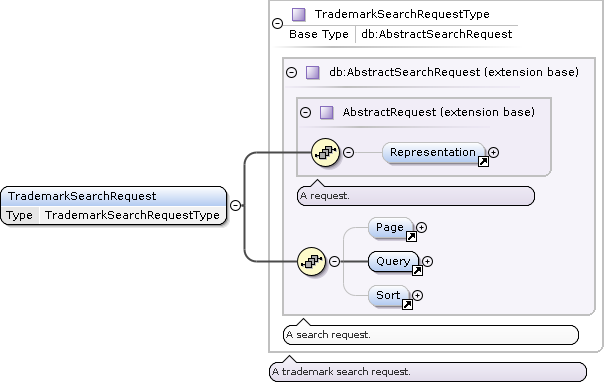
TrademarkSearchRequest Type
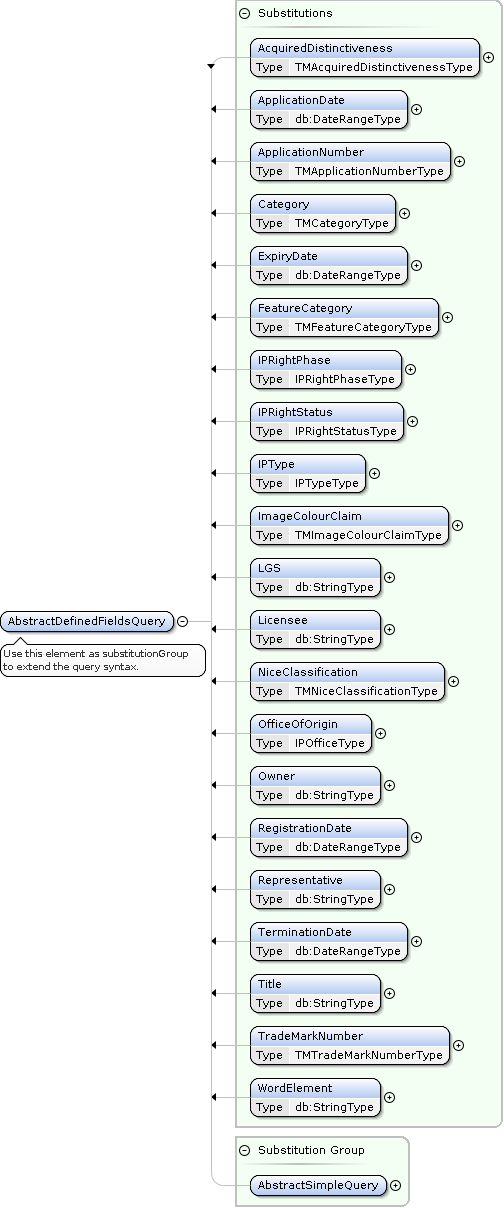
TrademarkSearch AbstractDefinedFieldsQuery Extensions
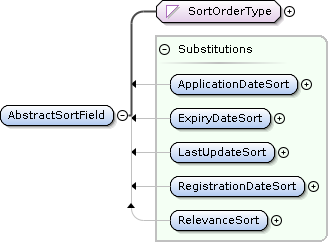
TrademarkSearch AbstractSortField Extensions
<?xml version="1.0"?>
<ApiRequest xmlns:xsi="http://www.w3.org/2001/XMLSchema-instance" xsi:schemaLocation="
    urn:ige:schema:xsd:datadeliverycore-1.0.0 urn:publicid:-:IGE:XSD+DATADELIVERYCORE+1.0.0:EN
    urn:ige:schema:xsd:datadeliverycommon-1.0.0 urn:publicid:-:IGE:XSD+DATADELIVERYCOMMON+1.0.0:EN
    urn:ige:schema:xsd:datadeliverytrademark-1.0.0 urn:publicid:-:IGE:XSD+DATADELIVERYTRADEMARK+1.0.0:EN"
  xmlns="urn:ige:schema:xsd:datadeliverycore-1.0.0" xmlns:tmk="urn:ige:schema:xsd:datadeliverytrademark-1.0.0">
  <Action type="TrademarkSearch">
    <tmk:TrademarkSearchRequest xmlns="urn:ige:schema:xsd:datadeliverycommon-1.0.0">
      <Representation details="Maximal" images="Link" strictness="Strict" itemBags="false">
        <Resource role="item" action="Embed"/>
      </Representation>
      <Page size="10"/>
      <Query>
        <tmk:ApplicationNumber>*/2020</tmk:ApplicationNumber>
      </Query>
      <Sort>
        <tmk:ApplicationDateSort>Descending</tmk:ApplicationDateSort>
        <LastUpdateSort>Descending</LastUpdateSort>
      </Sort>
    </tmk:TrademarkSearchRequest>
  </Action>
</ApiRequest>
PatentSearch action
Specification |
Value |
|---|---|
XSD Documentation |
|
XSD Schema |
|
Action element content |
|
Action |
|
Resource Role |
Kind |
Description |
|---|---|---|
|
common |
an item of the results of the search query |
|
common |
the images associated with the result item |
|
common |
the documents associated with the result item |
|
item facet |
ST.96 |
|
item facet |
ST.96 |
|
item facet |
ST.96 |
Note
The PatentPublication facet includes SearchReport data if available.
Item Facet |
ST.96 Swiss Superset XSD Schema |
|---|---|
|
https://schema.ige.ch/xml/st96/CHBibliographicData-1-0-0.xsd |
|
https://schema.ige.ch/xml/st96/CHPatentLegalStatusData-1-0-0.xsd |
|
https://schema.ige.ch/xml/st96/CHPatentPublication-1-0-0.xsd |
Detail level |
Description |
|---|---|
Minimal |
include |
OptimizeSpeed |
not used |
Default |
include |
Maximal |
include all item facets |
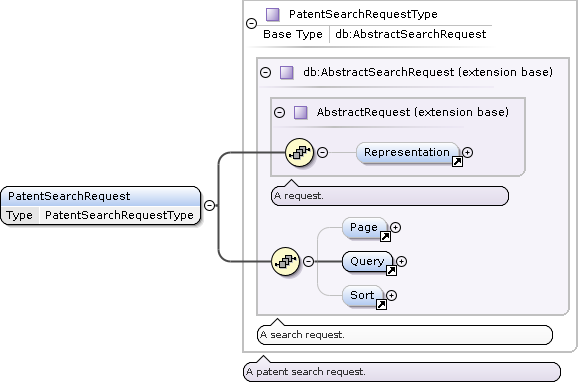
PatentSearchRequest Type
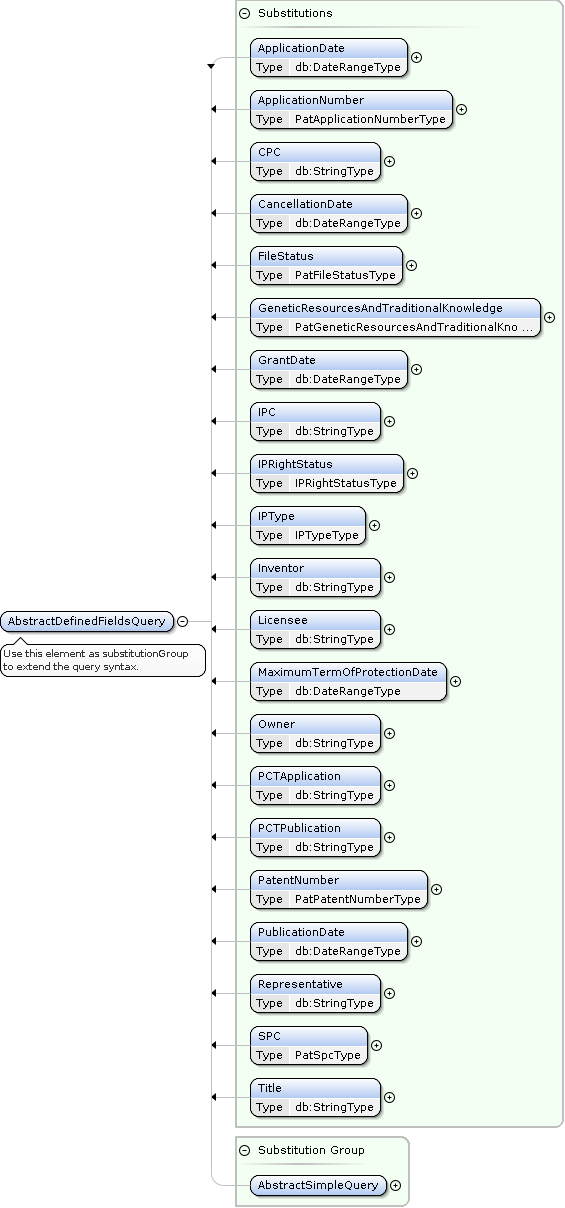
PatentSearch AbstractDefinedFieldsQuery Extensions
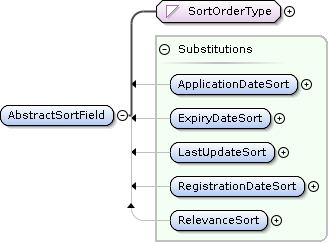
PatentSearch AbstractSortField Extensions
<?xml version="1.0"?>
<ApiRequest xmlns:xsi="http://www.w3.org/2001/XMLSchema-instance" xsi:schemaLocation="
    urn:ige:schema:xsd:datadeliverycore-1.0.0 urn:publicid:-:IGE:XSD+DATADELIVERYCORE+1.0.0:EN
    urn:ige:schema:xsd:datadeliverycommon-1.0.0 urn:publicid:-:IGE:XSD+DATADELIVERYCOMMON+1.0.0:EN
    urn:ige:schema:xsd:datadeliverypatent-1.0.0 urn:publicid:-:IGE:XSD+DATADELIVERYPATENT+1.0.0:EN"
  xmlns="urn:ige:schema:xsd:datadeliverycore-1.0.0" xmlns:pat="urn:ige:schema:xsd:datadeliverypatent-1.0.0">
  <Action type="PatentSearch">
    <pat:PatentSearchRequest xmlns="urn:ige:schema:xsd:datadeliverycommon-1.0.0">
      <Representation details="Maximal" images="Link" strictness="Strict">
        <Resource role="item" action="Embed"/>
        <Resource role="document" action="Link"/>
        <Resource role="BibliographicData" action="Embed"/>
        <Resource role="PatentLegalStatusData" action="Embed"/>
        <Resource role="PatentPublication" action="Embed"/>
      </Representation>
      <Page size="10"/>
      <Query>
        <And>
          <pat:IPType>CH patent</pat:IPType>
          <pat:ApplicationNumber>*/2020</pat:ApplicationNumber>
        </And>
      </Query>
      <Sort>
        <pat:ApplicationDateSort>Descending</pat:ApplicationDateSort>
      </Sort>
    </pat:PatentSearchRequest>
  </Action>
</ApiRequest>
PatentPublicationSearch action
Specification |
Value |
|---|---|
XSD Documentation |
|
XSD Schema |
https://schema.ige.ch/xml/datadelivery-patent-publication-1-0-0.xsd |
Action element content |
|
Action |
|
Resource Role |
Kind |
Description |
|---|---|---|
|
common |
an item of the results of the search query |
|
item facet |
ST.96 |
Item Facet |
ST.96 Swiss Superset XSD Schema |
|---|---|
|
https://schema.ige.ch/xml/st96/CHPatentLegalStatusData-1-0-0.xsd |
Detail level |
Description |
|---|---|
Minimal |
not used |
OptimizeSpeed |
not used |
Default |
include |
Maximal |
include all item facets |
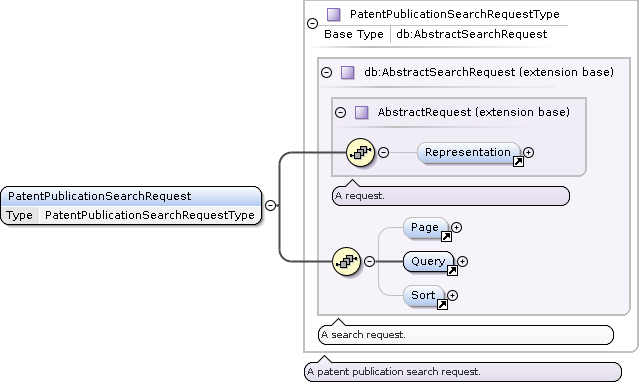
PatentPublicationSearchRequest Type
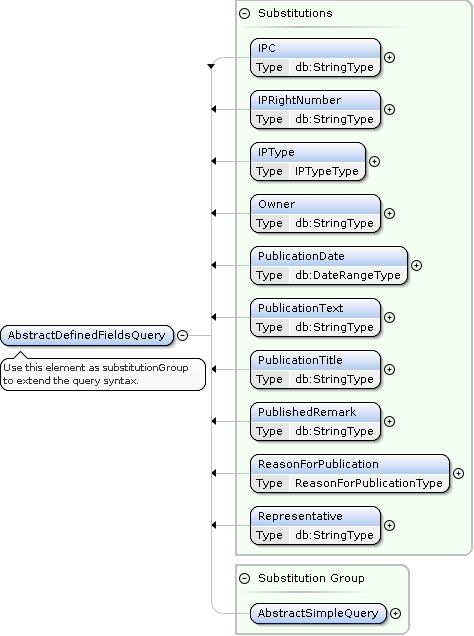
PatentPublicationSearch AbstractDefinedFieldsQuery Extensions
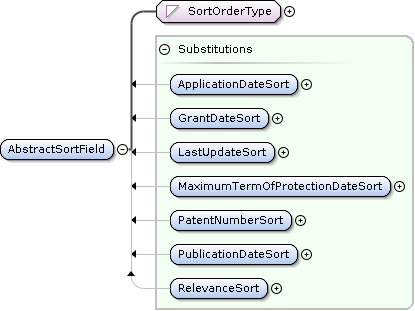
PatentPublicationSearch AbstractSortField Extensions
<?xml version="1.0"?>
<ApiRequest xmlns:xsi="http://www.w3.org/2001/XMLSchema-instance" xsi:schemaLocation="
    urn:ige:schema:xsd:datadeliverycore-1.0.0 urn:publicid:-:IGE:XSD+DATADELIVERYCORE+1.0.0:EN
    urn:ige:schema:xsd:datadeliverycommon-1.0.0 urn:publicid:-:IGE:XSD+DATADELIVERYCOMMON+1.0.0:EN
    urn:ige:schema:xsd:datadeliverypatentpublication-1.0.0 urn:publicid:-:IGE:XSD+DATADELIVERYPATENTPUBLICATION+1.0.0:EN"
  xmlns="urn:ige:schema:xsd:datadeliverycore-1.0.0" xmlns:patpub="urn:ige:schema:xsd:datadeliverypatentpublication-1.0.0">
  <Action type="PatentPublicationSearch">
    <patpub:PatentPublicationSearchRequest xmlns="urn:ige:schema:xsd:datadeliverycommon-1.0.0">
      <Representation details="Maximal" strictness="Strict">
        <Resource role="item" action="Embed"/>
        <Resource role="PatentLegalStatusData" action="Embed"/>
      </Representation>
      <Page size="10"/>
      <Query>
        <And>
          <patpub:IPType>CH patent</patpub:IPType>
          <patpub:PublicationDate from="2020-01-01"/>
          <Not>
            <patpub:ReasonForPublication>Withdrawal/Rejection</patpub:ReasonForPublication>
          </Not>
        </And>
      </Query>
      <Sort>
        <patpub:PublicationDateSort>Descending</patpub:PublicationDateSort>
      </Sort>
    </patpub:PatentPublicationSearchRequest>
  </Action>
</ApiRequest>
SPCSearch action
Specification |
Value |
|---|---|
XSD Documentation |
|
XSD Schema |
|
Action element content |
|
Action |
|
Resource Role |
Kind |
Description |
|---|---|---|
|
common |
an item of the results of the search query |
|
item facet |
ST.96 |
|
item facet |
ST.96 |
Item Facet |
ST.96 Swiss Superset XSD Schema |
|---|---|
|
https://schema.ige.ch/xml/st96/CHSPCBibliographicData-1-0-0.xsd |
|
https://schema.ige.ch/xml/st96/CHPatentLegalStatusData-1-0-0.xsd |
Detail level |
Description |
|---|---|
Minimal |
include |
OptimizeSpeed |
not used |
Default |
include |
Maximal |
include all item facets |
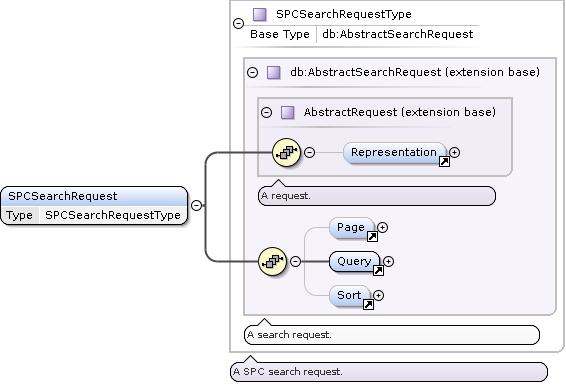
SPCSearchRequest Type
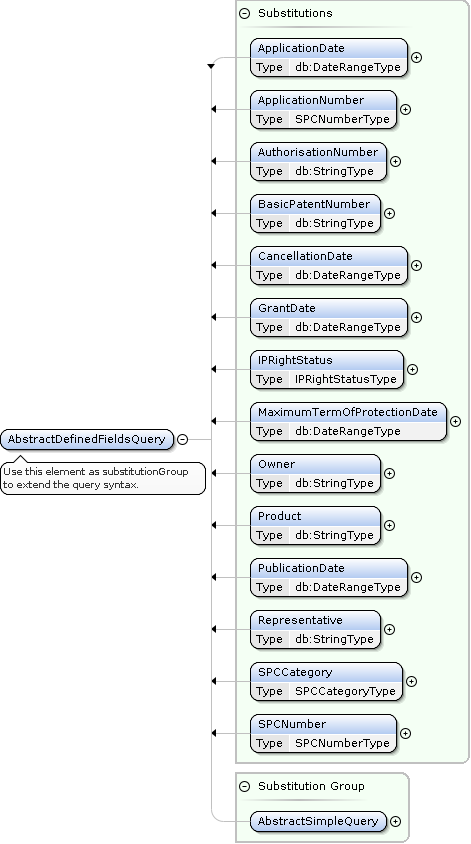
SPCSearch AbstractDefinedFieldsQuery Extensions
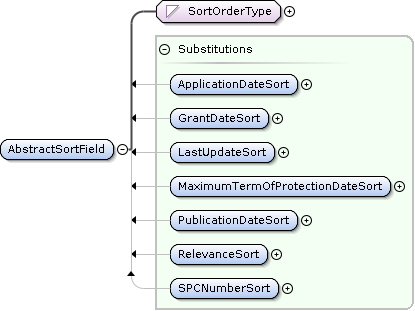
SPCSearch AbstractSortField Extensions
<?xml version="1.0"?>
<ApiRequest xmlns:xsi="http://www.w3.org/2001/XMLSchema-instance" xsi:schemaLocation="
    urn:ige:schema:xsd:datadeliverycore-1.0.0 urn:publicid:-:IGE:XSD+DATADELIVERYCORE+1.0.0:EN
    urn:ige:schema:xsd:datadeliverycommon-1.0.0 urn:publicid:-:IGE:XSD+DATADELIVERYCOMMON+1.0.0:EN
    urn:ige:schema:xsd:datadeliveryspc-1.0.0 urn:publicid:-:IGE:XSD+DATADELIVERYSPC+1.0.0:EN"
  xmlns="urn:ige:schema:xsd:datadeliverycore-1.0.0" xmlns:spc="urn:ige:schema:xsd:datadeliveryspc-1.0.0">
  <Action type="SPCSearch">
    <spc:SPCSearchRequest xmlns="urn:ige:schema:xsd:datadeliverycommon-1.0.0">
      <Representation details="Maximal" strictness="Strict">
        <Resource role="item" action="Embed"/>
        <Resource role="SPCBibliographicData" action="Embed"/>
        <Resource role="PatentLegalStatusData" action="Embed"/>
      </Representation>
      <Page size="10"/>
      <Query>
        <spc:GrantDate from="2020-01-01"/>
      </Query>
      <Sort>
        <spc:GrantDateSort>Descending</spc:GrantDateSort>
      </Sort>
    </spc:SPCSearchRequest>
  </Action>
</ApiRequest>
SPCPublicationSearch action
Specification |
Value |
|---|---|
XSD Documentation |
|
XSD Schema |
https://schema.ige.ch/xml/datadelivery-spc-publication-1-0-0.xsd |
Action element content |
|
Action |
|
Resource Role |
Kind |
Description |
|---|---|---|
|
common |
an item of the results of the search query |
|
item facet |
ST.96 |
Item Facet |
ST.96 Swiss Superset XSD Schema |
|---|---|
|
https://schema.ige.ch/xml/st96/CHPatentLegalStatusData-1-0-0.xsd |
Detail level |
Description |
|---|---|
Minimal |
not used |
OptimizeSpeed |
not used |
Default |
include |
Maximal |
include all item facets |
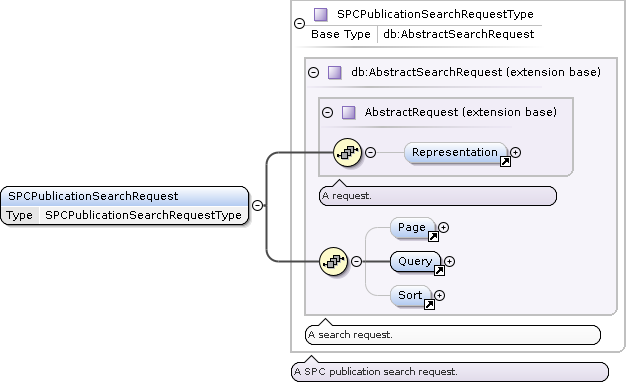
SPCPublicationSearchRequest Type
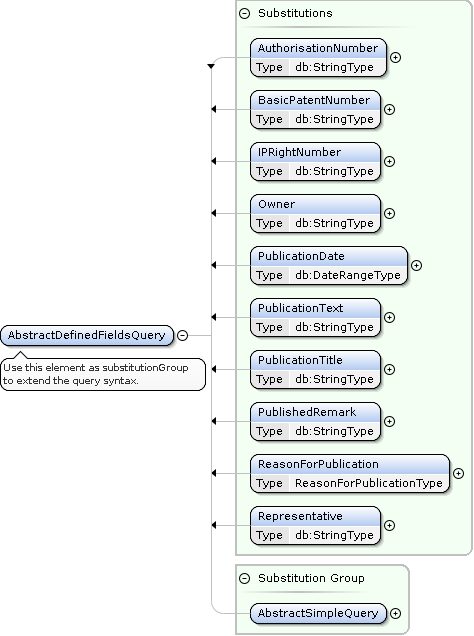
SPCPublicationSearch AbstractDefinedFieldsQuery Extensions
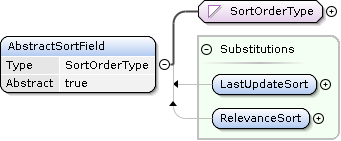
SPCPublicationSearch AbstractSortField Extensions
<?xml version="1.0"?>
<ApiRequest xmlns:xsi="http://www.w3.org/2001/XMLSchema-instance" xsi:schemaLocation="
    urn:ige:schema:xsd:datadeliverycore-1.0.0 urn:publicid:-:IGE:XSD+DATADELIVERYCORE+1.0.0:EN
    urn:ige:schema:xsd:datadeliverycommon-1.0.0 urn:publicid:-:IGE:XSD+DATADELIVERYCOMMON+1.0.0:EN
    urn:ige:schema:xsd:datadeliveryspcpublication-1.0.0 urn:publicid:-:IGE:XSD+DATADELIVERYSPCPUBLICATION+1.0.0:EN"
  xmlns="urn:ige:schema:xsd:datadeliverycore-1.0.0" xmlns:spcpub="urn:ige:schema:xsd:datadeliveryspcpublication-1.0.0">
  <Action type="SPCPublicationSearch">
    <spcpub:SPCPublicationSearchRequest xmlns="urn:ige:schema:xsd:datadeliverycommon-1.0.0">
      <Representation details="Maximal" strictness="Strict">
        <Resource role="item" action="Embed"/>
        <Resource role="PatentLegalStatusData" action="Embed"/>
      </Representation>
      <Page size="10"/>
      <Query>
        <And>
          <spcpub:PublicationDate from="2020-01-01"/>
          <Not>
            <spcpub:ReasonForPublication>Withdrawal/Rejection</spcpub:ReasonForPublication>
          </Not>
        </And>
      </Query>
      <Sort>
        <spcpub:PublicationDateSort>Descending</spcpub:PublicationDateSort>
      </Sort>
    </spcpub:SPCPublicationSearchRequest>
  </Action>
</ApiRequest>
SearchRequest Template
Search Actions are derived from the AbstractSearchRequest type, which acts as a template for all search based actions.
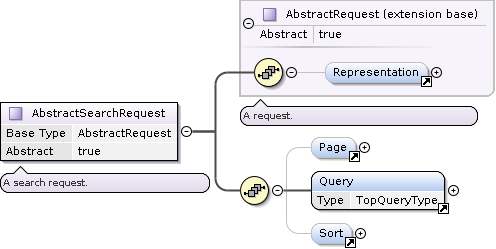
AbstractSearchRequest Type
Representation Element
The Representation element is used to specify how the result items should be delivered.
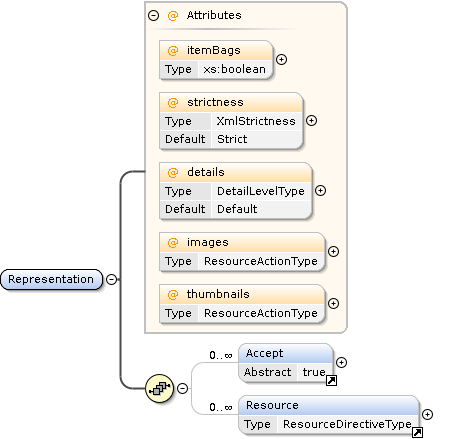
Representation Element
The details attribute can be used to select presets of result representation scope and fidelity.
The Resource child element can be used to override defaults and further refine the result data.
Each action has a set of supported resource roles, some common, like item (representing the whole search result item), image (the associated images), and document (the associated documents).
Some are specific to the concrete action and are called item facets. They represent additional associated data related to the search result item.
For example, if you want each item as a separate file within the ZIP Bundle, use the following:
<Representation xmlns="urn:ige:schema:xsd:datadeliverycommon-1.0.0">
   <Resource role="item" action="Bundle"/>
</Representation>
The special roles * and facet/* can be used to assign a ResourceAction to all roles or all item facet roles, respectively.
<Representation xmlns="urn:ige:schema:xsd:datadeliverycommon-1.0.0">
   <Resource role="*" action="Bundle"/>
</Representation>
ResourceAction |
Description |
|---|---|
|
Reference with a URI |
|
Embed into the result XML |
|
Add to the result ZIP Bundle |
|
Inline as RFC2397 data URL |
|
Do not include in the result |
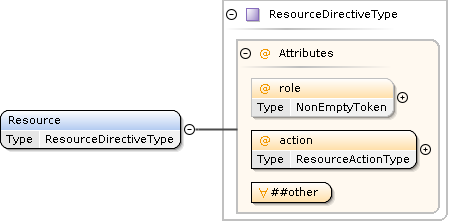
Resource Element
Page Element
The Page element is used to control the paging of the result items.
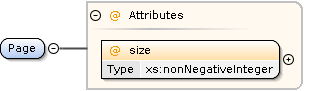
Page Element
Query Element
The Query element is used to describe the search criteria.
Concrete request types can extend the AbstractDefinedFieldsQuery element to provide domain specific search criteria.
see also: How-To: Building Search Queries
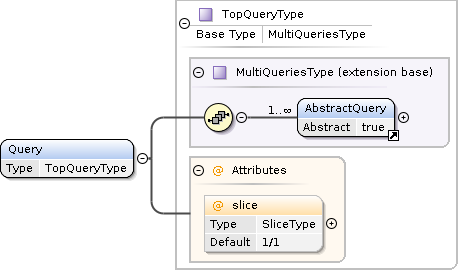
Query Element
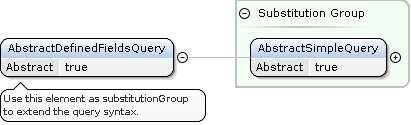
AbstractDefinedFieldsQuery
Sort Element
The Sort element is used to describe the sorting criteria.
Concrete request types can extend the AbstractSortField element to provide domain specific sorting criteria.

Sort Element
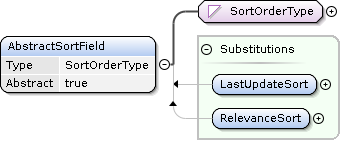
AbstractSortField
Special Actions
UserQuota Action
Specification |
Value |
|---|---|
XSD Documentation |
|
XSD Schema |
|
Action element content |
|
Action |
|
<?xml version="1.0" encoding="UTF-8"?>
<ApiRequest xmlns:xsi="http://www.w3.org/2001/XMLSchema-instance"
        xsi:schemaLocation="
        urn:ige:schema:xsd:datadeliverycore-1.0.0 urn:publicid:-:IGE:XSD+DATADELIVERYCORE+1.0.0:EN
        urn:ige:schema:xsd:datadeliveryquota-1.0.0 urn:publicid:-:IGE:XSD+DATADELIVERYQUOTA+1.0.0:EN"
        xmlns="urn:ige:schema:xsd:datadeliverycore-1.0.0">

        <Action type="UserQuota">
           <UserQuotaRequest xmlns="urn:ige:schema:xsd:datadeliveryquota-1.0.0"/>
        </Action>
</ApiRequest>
Echo Action
Specification |
Value |
|---|---|
Action element content |
any non |
Action |
|
<?xml version="1.0" encoding="UTF-8"?>
<ApiRequest xmlns:xsi="http://www.w3.org/2001/XMLSchema-instance" xsi:schemaLocation="
urn:ige:schema:xsd:datadeliverycore-1.0.0 urn:publicid:-:IGE:XSD+DATADELIVERYCORE+1.0.0:EN
http://www.w3.org/1999/xhtml http://www.w3.org/2002/08/xhtml/xhtml1-strict.xsd"
xmlns="urn:ige:schema:xsd:datadeliverycore-1.0.0">
<Action type="Echo">
<div xmlns="http://www.w3.org/1999/xhtml">
<span>Hello IPI & friends! <3</span>
<span>äëü éèê</span>
</div>
</Action>
<Action type="Echo">
<script xmlns="http://www.w3.org/1999/xhtml" type="dbg">AGAIN=foo! AGAIN=bar! AGAIN=baz!</script>
</Action>
<Action type="Echo">
<script xmlns="http://www.w3.org/1999/xhtml" type="dbg">THROW=testing boom!</script>
</Action>
</ApiRequest>
No Action
<?xml version="1.0" encoding="UTF-8"?>
<ApiRequest xmlns="urn:ige:schema:xsd:datadeliverycore-1.0.0"/>
API Requests
Security
A valid and unexpired access token is required to access the service.
See Authentication for information on how to get a token.
To authenticate send the token in a Authorization: Bearer IDP_ACCESS_TOKEN header, for example
Authorization: Bearer eyJhbGciOiJSUzI1NiIsInR5cCIgOiAiSldUIiwia2lkIiA6ICJYMWxrOURXQ1pSYjlpbkxxSlZnMERGRDRrblBOX25mWVlKOUVFV3c2QWhzIn0.eyJzdWIiOiIxMjM0NTY3ODkwIiwibmFtZSI6IkpvaG4gRG9lIiwiaWF0IjoxNTE2MjM5MDIyfQ.UYv5sdrUNFq1TOl2Ogr8BhWv9sHABKLVFMfJakNSZtb2ZmBpEsal0WBgALfNYDT8Owez6hzENACt-AOULFzb8s9HDkEs5WaWTkKgVSyuYi0mMtPqAN0-pkcByinyPwpoOqKBMQlXNHA3xtYGIUdyaxOwotxNMNQ44TiEfUO_ujHdjfnzIAcNABEXqU7YR6-3QIS37onw5pUpLfkiwYVvIcggomubV903tOh0SZo4EGtRlf-k7IaVBhkBM5EnA7AH2atF_ixzj03xAbs4GO4wBLekwnyEMwG1qmZlVAkh9kwgW9uHXYdPI1GmmQzgLy6cpKnRBLvX86-GbOrpgmEtiQ
Endpoints
Primary Endpoint
The primary endpoint /public/api/v1 is designed to receive an authenticated POST request with a XML encoded ApiRequest description.
Transferred response bytes are included in the calculation of the usage quota.
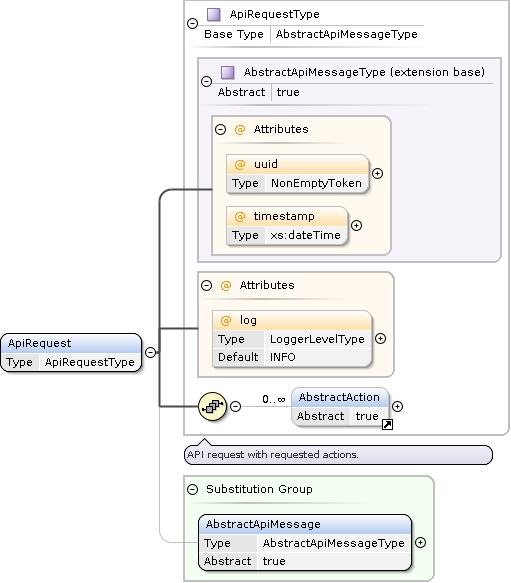
ApiRequest Element
Secondary Endpoints
Secondary endpoints are used in the ApiResponse of the primary endpoint to reference additional resources.
Images
Images are referenced using URIs with a path starting with /public/api/v1/resources/img/.
The client can fetch the image with an authenticated GET request.
Use pre-authentication (i.e., send the Authorization header with the initial request) to prevent redirects to the identity provider service.
Image formats include PNG, JPEG and TIFF. Check the Content-Type response header for the concrete format.
Transferred response bytes are included in the calculation of the usage quota.
Tip
Images are content-addressed, meaning that the URI corresponds directly to the image’s content. As a result, once you have downloaded the image and the URI remains unchanged, you won’t need to download it again. This approach helps conserve bandwidth and reduce quota consumption.
Documents
Documents are referenced using URIs with a path starting with /public/api/v1/resources/doc/.
The client can fetch the document with an authenticated GET request.
Use pre-authentication (i.e., send the Authorization header with the initial request) to prevent redirects to the identity provider service.
Document formats include PDF and TXT. Check the Content-Type response header for the concrete format.
Transferred response bytes are included in the calculation of the usage quota.
Warning
Documents are not content-addressed (yet). As a result, the same URI can yield different results over time.
API Responses
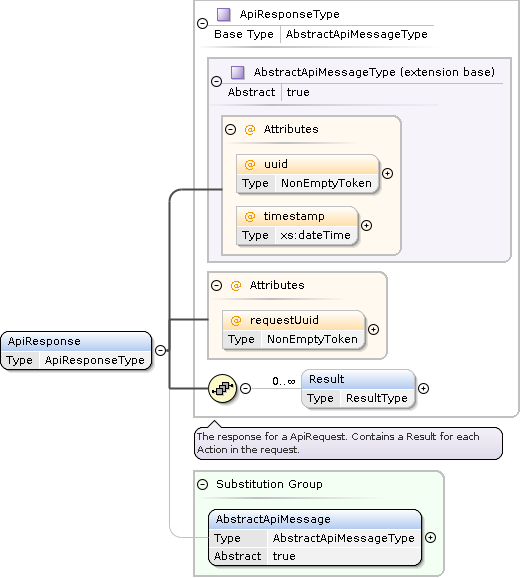
Response Formats
XML Document
Add the Accept: application/xml header to the request to receive XML response format.
ZIP Bundle
Add the Accept: application/zip header to the request to receive ZIP bundle response format.
The ApiResponse will be located in the top-level file /response.xml within the ZIP archive. All additional files bundled in the ZIP will have unique filenames, allowing them to be extracted into the same directory without overwriting previous response contents.
Tip
Utilizing the ZIP format can help minimize both bandwidth and quota consumption.
Tip
To create a unique name for the top-level ApiResponse file, add the filename-dynamic=true query parameter to the primary endpoint URI. For example, using /public/api/v1?filename-dynamic=true will generate a filename like /response-20250210T080835277003937Z-0194eee7-2ccd-7bad-b883-d264f77ed824.xml.
You can also customize the filename prefix with the filename parameter. Moreover, the filename-stamped parameter determines whether a timestamp and response UUID are appended to the filename. For instance, /public/api/v1?filename-dynamic=true&filename=myresponse123&filename-stamped=false will result in the filename /myresponse123.xml.
When filename-dynamic=true is enabled, the filename for the ApiResponse file can also be extracted from the Content-Disposition response header by substituting the .zip extension with .xml.
img and doc Resources
Images and documents retrieved from the secondary endpoints are provided in the format specified by the Content-Type response header.
Response Codes
Status code |
Possible Causes |
|---|---|
401 Unauthorized |
Token expired |
403 Forbidden |
Request Rejected |
429 Too Many Requests |
Quota Exceeded, Too many penalties |
503 Service Unavailable |
User Concurrency Exceeded, System overload |
Response Headers
X-IPI-SUCCESS
The X-IPI-SUCCESS header appears once and contains a boolean value (true or false)
to indicate whether all actions in the processed request were successfully completed.
X-IPI-CONTINUATION-NAME
The X-IPI-CONTINUATION-NAME headers lists the names of the continuation action names present in the response.
This header can occur multiple times, once for each distinct continuation name.
Content-Disposition
The standard Content-Disposition header (MDN)
is used to suggest a filename for the response.
Retry-After
The standard Retry-After header (MDN)
is used in redirect and error responses to specify the appropriate wait time for the client.
It can occur using both syntax variants: <http-date> (e.g. Retry-After: Fri, 7 Mar 2025 07:28:00 GMT) and <delay-seconds> (e.g. Retry-After: 120).
Server-Timing
The standard Server-Timing header (MDN)
is used to report server-side timing information.
Ratelimit-Weight
The Ratelimit-Weight header indicates the number of bytes, formatted as a decimal integer, that have been counted towards the quota for the current response.
X-IPI-PENALTY
The X-IPI-PENALTY header indicates the total count of accumulated penalties, formatted as a decimal integer.
X-IPI-ACQUIRE
The X-IPI-ACQUIRE header reports the ISO 8601 formatted duration (e.g. X-IPI-ACQUIRE: PT5.327691S) which was waited to receive a Request processing permit.
X-WAF-SUPPORT-ID
The X-WAF-SUPPORT-ID header is included for rejected requests with status code 403.
This header contains a token that network administrators can use to determine the reason for the rejection.
Usage Limits
Response Data Transfer Quota
Each user is granted a maximum of 2 GiB of response data within a rolling 24-hour window.
Data retrieved from both primary and secondary endpoints will contribute towards this quota. The quota consumption of each request is reported in the Ratelimit-Weight response header.
Tip
Use the ZIP Bundle format and the feature that images are content-adressed to reduce quota consumption.
Exceeding the Quota
If your data consumption surpasses the granted quota, you will receive a response with a 429 status code. This response will include a Retry-After header, which must be adhered to.
Tip
To simulate exceeding the quota, add the query parameter extra_data_consumption=-1 to your request URI (e.g., /public/api/v1?extra_data_consumption=-1 or /public/api/v1/resources/img/A2MBVdft8hv7MJKfsscRSoMH1xDrR8JZb?extra_data_consumption=-1).
Retrieving Quota Information
To access quota details, use the UserQuota Action. Ensure that you perform this action before the quota is exhausted.
Concurrency
A maximum of 12 requests can be processed concurrently.
During request processing, a permit from a semaphore that manages the allowed concurrency will be automatically acquired and released. If there is contention for access to the semaphore, the X-IPI-ACQUIRE response header will indicate the time spent waiting to obtain the permit.
Tip
Configure your HTTP 1.1 client to utilize a connection pool of appropriate size, such as allowing 12 connections for API endpoints. Ensure that established connections are reused for multiple requests.
Note that some client libraries might require manual configuration
or the addition of the Connection: keep-alive request header to correctly handle connection reuse.
import requests

api_session = requests.Session() # connection keep-alive is automatic within a session
api_session.mount("https://",
  requests.adapters.HTTPAdapter(
    pool_connections=12, pool_maxsize=12,
    max_retries=0, pool_block=True))

api_args = {'headers': {'Content-Type': 'application/xml', 'Accept': 'application/xml'} }
api_response = api_session.post(api_endpoint, data=api_request_xml, **api_args)
Penalties
If a client sends bad requests that result in 4xx or 5xx response statuses, a penalty will be recorded and the release of the concurrency permit will be delayed.
Penalties may also be imposed if access tokens are not reused or if excessive concurrent requests cause timeouts during the acquisition of request permits.
If the client makes no requests for 15 minutes, the penalty count will reset to zero.
As penalties accumulate, the delay for releasing semaphore permits will gradually increase (up to 15 seconds), while the available concurrency decreases (down to 1). Once 2048 penalties are recorded, further processing will be halted for 15 minutes, and the client will receive a 503 response status.
Glossary
- Request processing permit
A permit which must be acquired from the per user concurrency semaphore. See Concurrency Limits
Deep Dives
Conceptual Model
API Messages
Fundamentally, API clients and the API service exchange XML-encoded
ApiMessages over HTTP.
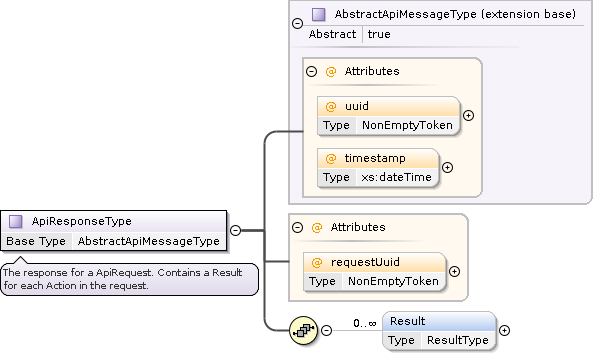
The API client sends an ApiRequest XML document to the
primary API endpoint and receives
an ApiResponse XML document, which can be in either
XML Document or
ZIP Bundle format.
|
|
|---|---|
wraps actions |
wraps results |
|
|

API Actions
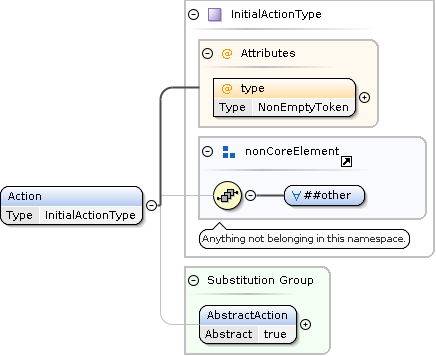
API actions allow the client to specify the desired processing of the API service. Each ApiRequest can contain zero, one, or multiple actions.
An empty ApiRequest with zero actions can be used to verify the readiness of the API service.
Initial Actions
Initial actions must be wrapped in an Action element, and the mandatory type attribute triggers the associated processing in the API service.
The payload of the Action element describes the desired processing and must be a well-formed and valid XML fragment conforming to the associated XSD schema for that action.
Some actions support the Representation element to specify the desired result structure.
Search actions introduce the concept of item facets to represent additional associated data related to the search result item.
Continuations
Continuation actions are special XML elements produced by the API service.
They contain opaquely encoded information required for the continuation of processing.
For example, search actions can produce NextPage continuations for the delivery of the next page of result items (see full traversal).
To invoke the processing of a continuation, the API client can include the entire unmodified Continuation element from the Result in a follow-up ApiRequest.
In particular, the mandatory name attribute must not be altered.
API Results
For each action in the ApiRequest, there will be a corresponding result in the ApiResponse.
The actions and results are matched in document order; that is, the first result corresponds to the first action, the second to the second, and so forth.
In addition to the success attribute, the structure of an ApiResult includes the following optional elements:
Log: Collects
LogEntryelements if present.Continuations: Includes possible continuation actions (e.g.,
NextPagefor search actions).ResultData: Contains data elements (XML, text, binary, or reference information) to return the result of the action processing. The
Metaelement conveys information such as the paging progress. Composite data can be structured with theDataBagelement (e.g., for separating different result items when delivering multiple item facets).
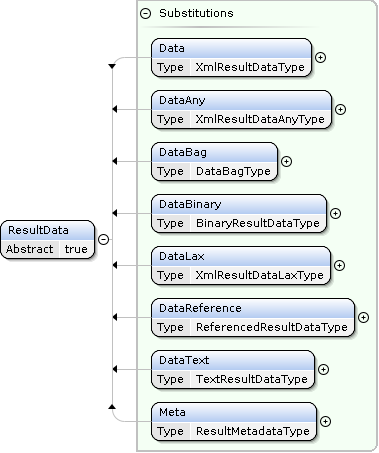
        ---
config:
  class:
    hideEmptyMembersBox: true

---
classDiagram

namespace message {
  class ApiRequest:::style_message {
    content: XML
  }
  class ApiResponse:::style_message {
    content: XML
  }
  class ResponseBundle:::style_message {
    <<ZIP>>
  }
  class BundleEntry:::style_message {
    path: string
    data: byte[]
  }
  class ApiResponseBundleEntry:::style_message {
    path: "/response.xml"
  }
}
classDef style_message fill:#faf;
BundleEntry <|-- ApiResponseBundleEntry
ResponseBundle *--> "1..n" BundleEntry
ResponseBundle *--> "1" ApiResponseBundleEntry : response
ApiResponseBundleEntry ..> "1" ApiResponse : contains
ApiResponse --> "1" ApiRequest

namespace data {
  class ResultData:::style_data {
    <<interface>>
    id?: token
    role?: token
    context?: token
  }
  class Meta:::style_data
  class DataBag:::style_data
  class Data:::style_data {
    xmlProcessContents: "strict"
    data: XML
  }
  class DataLax:::style_data {
    xmlProcessContents: "lax"
    data: XML
  }
  class DataAny:::style_data {
    xmlProcessContents: "skip"
    data: XML
  }
  class DataText:::style_data {
    type?: MIME
    data: string
  }
  class DataBinary:::style_data {
    type?: MIME
    checksum?: string
    data: byte[]
  }
  class DataReference:::style_data {
    type?: MIME
    checksum?: string
    target: URI
  }
  class BundleReference:::style_data
}
classDef style_data fill:#ffa;
ResultData <|.. DataBag
DataBag *--> "0..n" ResultData : data
ResultData <|.. DataAny
ResultData <|.. DataLax
ResultData <|.. Data
Data <|-- Meta
ResultData <|.. DataText
ResultData <|.. DataBinary
ResultData <|.. DataReference
DataReference <|-- BundleReference
BundleReference --> "1" BundleEntry : entry

namespace common {
  class Representation:::style_common {
    itemBags?: boolean
    images?: ResourceAction = LINK
    details?: DetailLevel = DEFAULT
    strictness?: ProcessingMode = STRICT
  }
  class Resource:::style_common {
    role?: token
    action: ResourceAction
  }
  class ResourceAction:::style_common {
    <<enumeration>>
    LINK
    EMBED
    BUNDLE
    DATA_URL
    SKIP
  }

  class DetailLevel:::style_common {
    <<enumeration>>
    MINIMAL
    OPTIMIZE_SPEED
    DEFAULT
    MAXIMAL
  }

  class ProcessingMode:::style_common {
    <<enumeration>>
    SKIP
    LAX
    STRICT
  }
}
classDef style_common fill:#faa;
Representation --> "1" DetailLevel
Representation --> "1" ProcessingMode
Representation --> "0..n" Resource
Resource --> "1" ResourceAction


namespace search {
  class Page:::style_search {
    size: int
  }
  class TopQuery:::style_search {
    slice: string = "1/1"
  }
  class Query:::style_search {
    <<interface>>
  }
  class SimpleQuery:::style_search {
    <<interface>>
  }
  class Id:::style_search
  class Any:::style_search
  class LastUpdate:::style_search
  class DefinedFieldsQuery:::style_search {
    <<interface>>
  }
  class UndecoratedQuery:::style_search {
    <<interface>>
  }
  class DecoratedQuery:::style_search {
    <<interface>>
  }
  class Require:::style_search
  class Exclude:::style_search

  class CompoundQuery:::style_search {
    <<interface>>
  }
  class And:::style_search
  class Or:::style_search
  class Not:::style_search

  class Sort:::style_search
  class SortField:::style_search {
    <<interface>>
    order: "Ascending" | "Descending"
  }
  class RelevanceSort:::style_search
  class LastUpdateSort:::style_search
}
classDef style_search fill:#f88;
Query <|-- DecoratedQuery
Query <|-- UndecoratedQuery
UndecoratedQuery <|-- SimpleQuery
UndecoratedQuery <|-- CompoundQuery
CompoundQuery <|.. Or
CompoundQuery <|.. And
CompoundQuery <|.. Not

SimpleQuery <|.. Id
SimpleQuery <|.. Any
SimpleQuery <|.. LastUpdate
SimpleQuery <|-- DefinedFieldsQuery
note for DefinedFieldsQuery "extension point for additional search criteria"

DecoratedQuery *--> "1" SimpleQuery : query
DecoratedQuery <|.. Require
DecoratedQuery <|.. Exclude

TopQuery *--> "1..n" Query : disjunctiveQueries
Or *--> "1..n" Query : queries
And *--> "1..n" Query : queries
Not *--> "1" Query : query

Sort *--> "1..4" SortField : criteria
SortField <|.. RelevanceSort
SortField <|.. LastUpdateSort
note for SortField "extension point for additional sort criteria"

namespace action {
  class Action:::style_action {
    <<interface>>
  }

  class InitialAction:::style_action {
    <<interface>>
    type: string
    content: XML
  }

  class Continuation:::style_action {
    name: string
    content: string
  }

  class SearchAction:::style_action {
    <<interface>>
    representation: Representation
    paging: Page
    query: TopQuery
    sorting: Sort
  }

  class Echo:::style_action
  class QuotaStatus:::style_action
  class TrademarkSearch:::style_action
  class PatentSearch:::style_action
  class PatentPublicationSearch:::style_action
  class SPCSearch:::style_action
  class SPCPublicationSearch:::style_action
}
classDef style_action fill:#afa;
ApiRequest *--> "0..n" Action : actions
Action <|-- InitialAction
Action <|.. Continuation
InitialAction <|.. Echo
InitialAction <|.. QuotaStatus
InitialAction <|-- SearchAction
SearchAction <|.. TrademarkSearch
SearchAction <|.. PatentSearch
SearchAction <|.. PatentPublicationSearch
SearchAction <|.. SPCSearch
SearchAction <|.. SPCPublicationSearch
SearchAction *--> "0..1" Representation : representation
SearchAction *--> "0..1" Page : paging
SearchAction *--> "1" TopQuery : query
SearchAction *--> "0..1" Sort : sorting

namespace result {
  class Result:::style_result {
    success: boolean
  }
  class LogEntry:::style_result
}
classDef style_result fill:#aaf;
ApiResponse *--> "0..n" Result : results
Result --> "1" Action : action
Result *--> "0..n" LogEntry : logs
Result *--> "0..n" Continuation : continuations
Result *--> "0..n" ResultData : data
Conceptual Overview
IPI Datadelivery XML Schemas
XML Catalog
The XML catalog is available at: https://schema.ige.ch/xml/catalog.xml
Core and Common Schemas
The datadelivery-core-1-0-0 and datadelivery-common-1-0-0 are used
as base schemas for API requests, responses, actions and results.
datadelivery-core-1-0-0
XSD Documentation: datadelivery-core-1-0-0
XSD Schema: https://schema.ige.ch/xml/datadelivery-core-1-0-0.xsd
datadelivery-common-1-0-0
XSD Documentation: datadelivery-common-1-0-0
XSD Schema: https://schema.ige.ch/xml/datadelivery-common-1-0-0.xsd
ST.96 Swiss Interoperable Superset XSD Schemas
Whenever possible, the API service produces XML results conforming to the ST.96 WIPO standard.
Swiss extensions to the ST.96 WIPO standard follow the following specification:
ST.96 - ANNEX V, IMPLEMENTATION RULES AND GUIDELINES, Version 7.1
  APPENDIX A - EXAMPLES OF ST.96 INTEROPERABLE SCHEMAS
    2. Design-Stage Schemas - Flattened Schemas
    2.1. Add an optional element
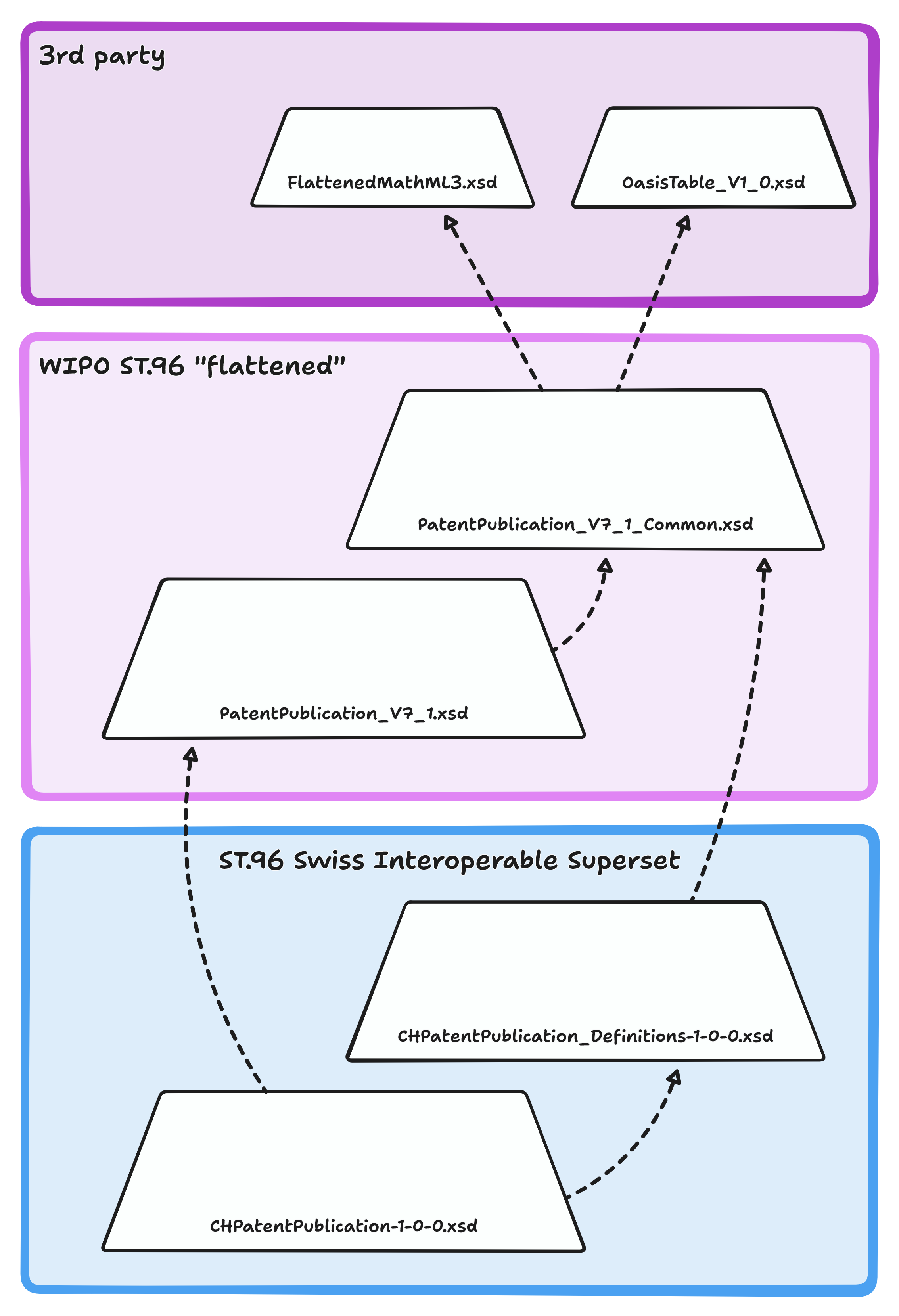
Schema inheritance overview
Why XML?
XML, the Extensible Markup Language, is derived from SGML, the Standard Generalized Markup Language. SGML has been a cornerstone of document management systems for decades. As a simplified subset of SGML, XML inherits its robustness and flexibility, making it a mature choice for data representation and interchange.
The Specific Case for XML
In the Intellectual Property (IP) domain, XML has long been the established means of information exchange. Standards like WIPO’s ST.96 are actively maintained, developed, and widely used by many parties within the IP space.
Relevance for the IPI datadelivery API:
The API service produces XML results conforming to the ST.96 standard whenever possible.
Clients must process XML responses, so it is natural to maintain consistency by using XML to represent request details as well. This is particularly beneficial for requests with significant inherent complexity, such as unambiguously representing sophisticated nested queries combined with logical predicates (AND/OR/NOT).
Additionally, the API allows for request input validation by both the API service and the clients before processing. This ensures data integrity and reduces the likelihood of errors during data interchange.
The General Case for XML
XML has been in use since its standardization in 1998, providing over two decades of service in various technological domains. Its longevity has resulted in a rich set of mature tools and technologies, making it a battle-tested choice for enterprise-level applications. While alternative formats like JSON have grown in popularity due to their perceived simplicity and reduced verbosity, XML offers several benefits:
Extensibility: XML’s design allows for the composition of different schemas. This enables a single document to seamlessly incorporate elements from various XML vocabularies, facilitating a modular and flexible design approach. XML supports the merging of schemas via namespaces, a feature essential for complex data representations involving multiple domains. This allows the integration of new data types without disrupting existing structures.
Comprehensive Support Across Platforms: XML is widely supported by major programming languages like Java, .NET, and Python, offering robust libraries and APIs for efficient processing. Its universal format ensures interoperability and cross-platform compatibility, adhering to W3C standards. Additionally, extensive community resources and documentation provide strong support for developers.
Tooling Maturity: A wide range of robust tools for editing, validating, and transforming XML data exists. Editors like Oxygen XML Editor offer advanced functionalities, including schema validation and integrated XSLT processing.
Standards and Schemas: The XML ecosystem supports numerous standards, such as XSD (XML Schema Definition) for schema definitions, which provide rigorous data typing and validation functionalities. This offers a level of precision in defining structured data that JSON Schema is still evolving to match.
Transformation Technologies: XSLT (eXtensible Stylesheet Language Transformations) enables powerful transformations of XML data, facilitating complex data manipulation, presentation, and interoperability between diverse systems.
XML Catalogs: XML catalogs provide a way to manage and resolve multiple namespaces and schema locations, a critical feature in large-scale systems where many interoperating schemas are used.
Despite its strengths, XML has faced criticism and several myths have emerged. Here are some common misconceptions and clarifications:
Myth: XML is overly verbose and cumbersome.
Fact: While XML can be more verbose compared to JSON, its verbosity is a byproduct of its design goals, which include readability, explicit structure, and self-description. In many enterprise applications, the benefits of a self-describing and well-validated format far outweigh the increased document size.Myth: XML is obsolete in the modern development landscape.
Fact: XML continues to thrive in domains where strict validation, data integrity, and robust data transformations are key. Many industries, including finance, healthcare, and legal documentation, rely on XML for data interchange due to its maturity and reliability.Myth: JSON is always a better choice.
Fact: JSON is indeed simpler and better suited for scenarios where lightweight data transfer is required. However, in contexts that demand strict adherence to standards, complex data structuring, and extensive tool support, XML remains unmatched.
Terms of use
General Legal Notice
The whole API service is subject to the general terms and conditions outlined here: Legal notice
Compliant use
Users of the API service are expected to
keep the usage within granted limits
respect the
Retry-Afterresponse headers